
The direct answer
Let your own website own the audience journey, use a link hub as the connector between platforms and that website, and treat social profiles as rented discovery surfaces rather than the home of anything you cannot afford to lose. Control, portability, analytics depth and accessibility are strongest on a first-party site. The link hub earns its place with speed and simplicity. Social profiles bring discovery, but their rules, reach and features belong to the platform, not to you.
The three options, fairly stated
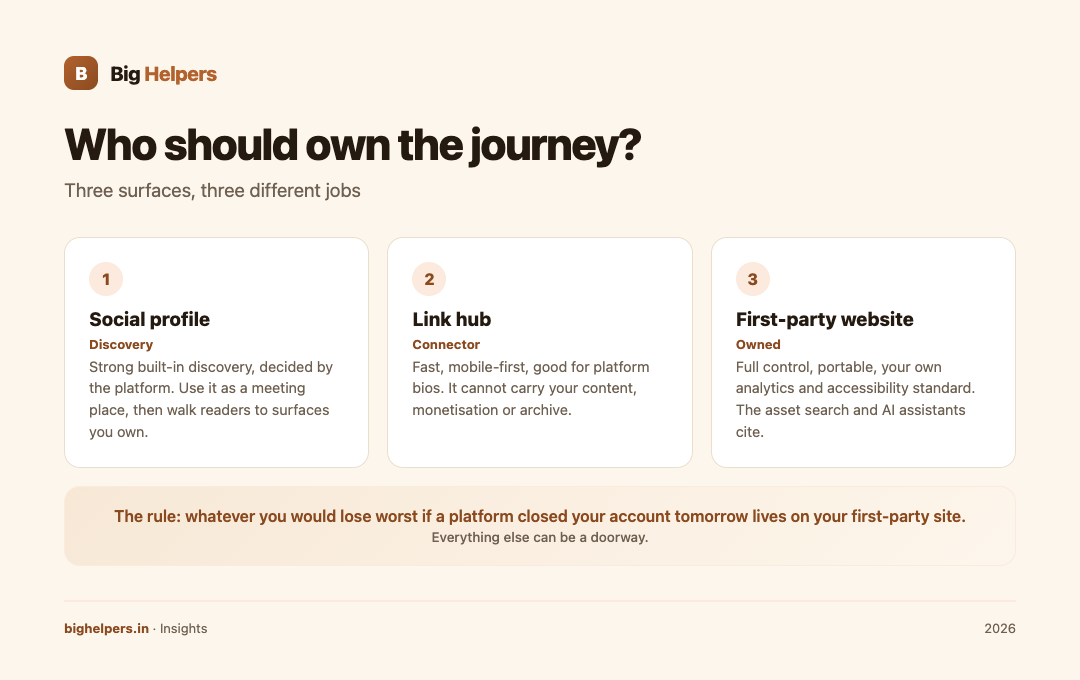
A first-party website is a domain and site you control: pages, content, structure and data. A link hub is a single mobile-friendly page that holds your links, used where platforms allow only limited linking. A social profile is your presence inside someone else's product, where the platform decides what your audience sees.
None of these is wrong. The mistake is assigning the wrong job to each: running your whole business from a rented profile, or expecting a link hub to do a website's work.
The comparison
| Dimension | First-party website | Link hub (for example YourLinks) | Social profile |
|---|---|---|---|
| Discovery | Search engines, AI assistants, referrals, shares | Reached via a link you share; no standalone discovery | Strong built-in discovery, decided by the platform |
| Control | Full: structure, content, monetisation, rules you accept only by hosting choice | Full control of what is listed; layout within the tool's patterns | Platform decides formats, reach and rules |
| Maintenance | Highest: updates, security, backups | Low: edit a list | Lowest: post and respond |
| Portability | Yours: content, domain, data move with you | List is portable in spirit; the page lives on the service | Export options are whatever the platform grants |
| Analytics | Your own measurement, subject to your consent choices | Whatever the service provides plus your campaign tags | Platform's own insights, on its terms |
| Accessibility | You own the standard: you can meet WCAG link-purpose and structure rules | Depends on the service; preview before committing | Platform's implementation |
| Cost | A build or your time | Often free or low cost | No fee to join; the real cost is dependence |
What a first-party website costs, concretely
Big Helpers publishes its web development tiers openly, and they make the website row of the table tangible. The Starter tier, a static or template site of three to six pages, is listed at Rs 15,000 to 40,000 and typically live in five to seven days. The Business tier, WordPress or hybrid with CMS, blog, lead forms and local SEO setup, is listed at Rs 40,000 to 1.2 lakh. The Custom tier, custom Next.js with multilingual support, integrations and dashboards, is listed at Rs 1.2 lakh to 4 lakh, with overall timelines of two to eight weeks across tiers. All tiers hand over ownership at launch: code, hosting access and documentation. The full detail is on the web development service page.
Two comparisons help before you pick a lane: website builder versus agency in India for how a site gets built, and SEO website versus normal website for what a site must do to earn search traffic.
What the link hub is for
The link hub is a connector, not a destination. It earns its place in two situations: platforms that allow only limited linking, and the moment of curiosity when a reader wants "everything by this person" in one glance. It loses its place the moment it becomes your only home, because a list of links cannot carry your content, your monetisation choices or your archive.
YourLinks, from the Big Helpers apps page, is a verified option for this layer. Its App Store listing describes a creator workspace for managing and previewing a link-in-bio page: create a page, choose a handle, review page identity details, and open a native preview showing featured links, social destinations, collections and content blocks. The listing states the developer does not collect data from the app, and it is free on iOS with Android in controlled testing. The preview-first design matters: you check what readers will see before you share the link, and its accessible mobile layout keeps the hub honest to its one job.
What the social profile is for
Social profiles are where unfamiliar audiences are. Their reach machinery is unmatched and their price is unbeatable, but every dependency is real: the algorithm that decides who sees you, the rules that decide what is allowed, and the design changes that arrive without your consent. Treat the profile as a meeting place, then walk interested readers to surfaces you own, with a link that carries a campaign tag so you can see the journey.
Three reader situations
| Situation | Sensible shape | Why |
|---|---|---|
| New creator, no budget | Social profile for discovery, link hub as the connector, one good destination page as soon as possible | Start where audiences are; keep the bridge ready |
| Service seller with regular enquiries | First-party website as the hub; link hub for platform bios; social for proof and reach | Enquiries need a page that persuades and converts |
| Established publisher | Website owns everything; social and link hubs are entrances, tagged and measured | Protect the asset that search and AI assistants cite |
Whatever the shape, keep the promise continuous: if a social post says "full guide on my site", the link must land on that guide, not the homepage. Accessible, descriptive links are part of the job, not polish.
A rule for deciding
Write down the one thing you would lose worst if a platform closed your account tomorrow. That thing lives on your first-party site. Everything else can be a doorway. Creators sorting this stack end to end can start on our creators page.
FAQs
Is a link-in-bio page a replacement for a website?
No. It is a connector: fast, mobile-first, good for platform bios. It cannot host your archive, your monetisation choices or your search presence.
Which should I build first?
The profile is free and takes an hour; the link hub takes an afternoon; the website is the only one that compounds. If budget forces a sequence: profile, then a real destination page, then the fuller site.
What does a first-party website cost in India?
Big Helpers lists Rs 15,000 to 40,000 for a starter static site, Rs 40,000 to 1.2 lakh for a WordPress business build, and Rs 1.2 lakh to 4 lakh for custom Next.js, with two to eight week timelines. Details are on the service page.
How do I keep analytics honest across all three?
Measure on what you own, tag every link you share with campaign parameters, and accept platform insights as directional rather than definitive.
Can a social profile be my only presence?
You can, but you are holding your audience in a room whose landlord you have never met. Rules change, accounts get suspended, and formats get retired. Own at least one page nobody can take away.
Your next step
If the comparison has convinced you that a first-party site should own your journey, look at the Big Helpers web development tiers and pick the tier that matches your situation rather than your ambition: a starter site shipped this month beats a custom build planned forever.
Sources & references
- Big Helpers web development service tiers: bighelpers.in/services/web-development/ (fetched 29 August 2026)
- YourLinks App Store listing: apps.apple.com/in/app/yourlinks/id6797184337, and Big Helpers apps page: bighelpers.in/apps/
- W3C, WCAG 2.2 Understanding SC 2.4.4 Link Purpose (In Context): w3.org/WAI/WCAG22/Understanding/link-purpose-in-context.html
Pricing in this guide is verified as of the article date. Verify with vendors before committing budget — rates change quarterly.