
Short answer
Choose one primary language for your profile and add a second only when a real part of your audience needs it. Translate the context: who you are, what you offer, how to contact you. Keep links, prices, handles and offers identical in both languages, and label each language clearly. Review the second language quarterly, or drop it. YourLinks is a creator workspace for a link-in-bio page; its iOS app interface supports English, Hindi, Spanish, Portuguese and Indonesian.
Two languages is a strategy. Three is a staff problem.
Anjali illustrates from Kochi and sells prints to local buyers, plus studios in Bengaluru. Her buyers speak Malayalam at the market and English in email. Roshan teaches fitness in Hindi to a lakh followers, and once a month a brand asks whether he has an English page.
Both feel the same pull: "give everyone their language." The honest version is narrower. Every language you add doubles the writing, the checking and the risk of saying different things to different people. A half-maintained second language reads worse than none, because it signals neglect on your busiest page.
So the decision is a ladder, not a leap.
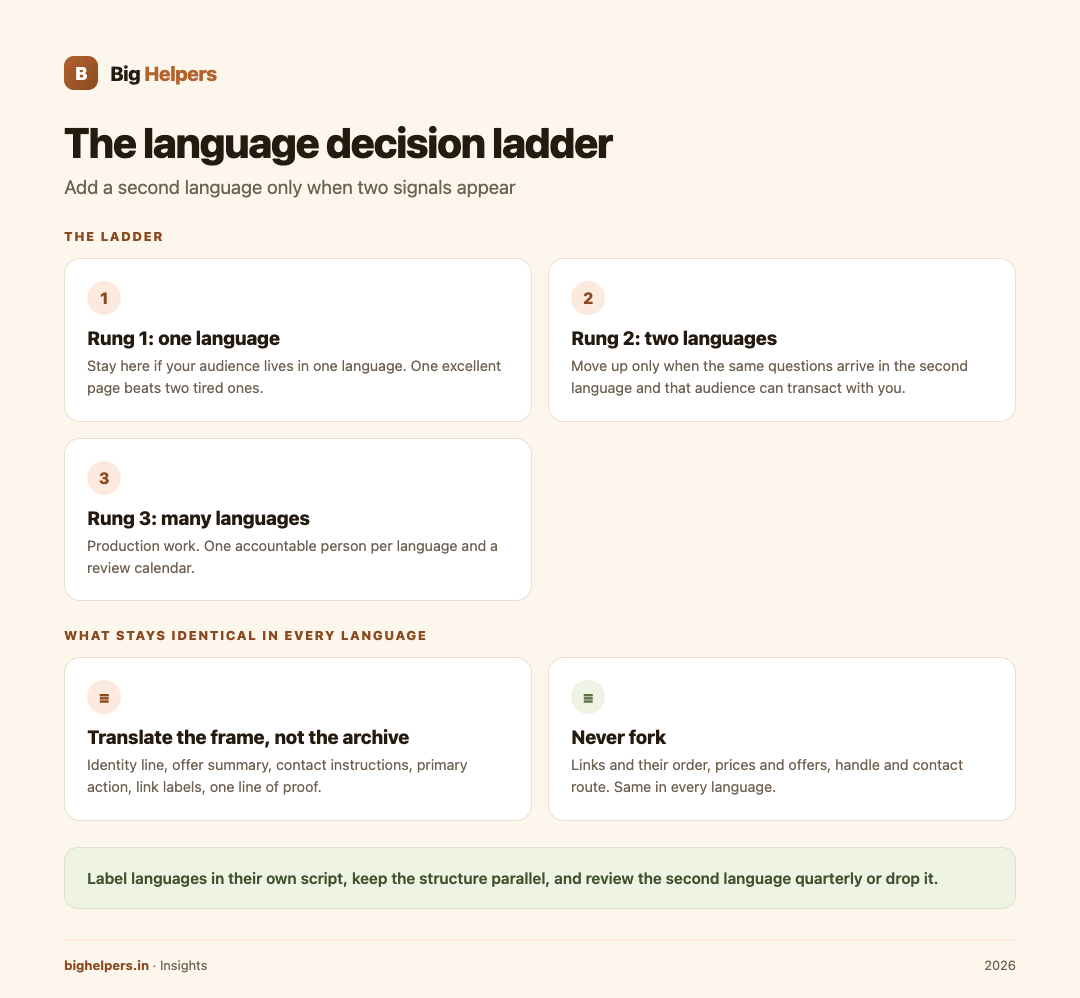
The decision ladder
Rung 1: One language. Stay here if your audience demonstrably lives in one language, or if you cannot commit to a quarterly review of a second. One excellent page beats two tired ones.
Rung 2: Two languages, when two signals appear. Move up only when both are true:
- You regularly receive the same question in the second language, such as delivery, pricing or booking queries.
- The second-language audience can actually transact with you: you can chat with them, take their payment and serve them.
For Anjali, Malayalam plus English qualifies. For Roshan, Hindi alone qualifies until brand enquiries turn into real audience demand, not curiosity.
Rung 3: Many languages, only with help. Three or more languages is production work. It needs a person accountable for each language and a review calendar. Solo creators should not live here.
Translate the context, not the content
You do not duplicate a profile by translating everything you have ever made. You translate the frame around your work:
- The identity line: who you are, whom you help.
- The offer summary: what they can buy, book or join.
- The contact instructions and service area.
- The primary action button and link labels.
- One or two lines of proof.
Leave in the primary language, with honest labels if needed: your portfolio of past work, long testimonials, blog posts, captions. Audiences accept that a creator's archive sits in the creator's main language. What they cannot accept is not knowing how to contact you or order in their own words.
Keep the constants constant
Whatever the language, these never fork:
- Links and their order. The same destinations, in the same priority order, in every language. A link that exists only in the Hindi page is a broken promise to the English audience.
- Prices and offers. One price list. If it differs by market, that is a currency or region decision, and it should be written down, not improvised per language.
- Your handle and identity. Same name, same face, same proof strip. Translation changes the words, not the person.
- Contact route. One WhatsApp number, one email. Both languages point to the same door.
Navigation and labels
Make switching obvious and consistent:
- Place the language switch in the same spot on every version, usually near the identity line or top corner.
- Label languages in their own script: "English", "हिंदी", "മലയാളം". A Hindi speaker should not have to read English to find Hindi.
- Never auto-switch silently. Let the visitor choose, and remember the choice if the platform allows.
- Keep the structure parallel. If the Malayalam page has five links, the English page has the same five, in the same order.
Anjali's page, once, in two languages
Malayalam: "ഞാൻ കൊച്ചിയിൽ നിന്നുള്ള ഇല്ലസ്ട്രേറ്ററാണ്. പ്രിന്റുകളും കസ്റ്റം വർക്കും." Then: view prints, order custom work, delivery note, WhatsApp. English: "Illustrator from Kochi. Prints and custom work." Then the same four links, same order, same prices.
Total extra work: one translated frame, reviewed each quarter, around work that stays in whatever language it was made in. That is the whole trick.
Audience first, effort second
Choosing a language is a marketing decision with evidence, not a feeling. The Hindi SEO guide walks through when a second language actually pays for an Indian audience and when it does not, and the local SEO playbook covers the city-level discovery that usually matters more than a second language. The creators page is useful when your profile grows into a full portfolio site.
Where YourLinks fits
YourLinks is a Big Helpers product. The apps page describes it as "A creator workspace for publishing and managing a link-in-bio page", with availability "Available on iOS. Android is in controlled testing."
What is verified about language support is specific: the iOS app's App Store listing, checked on 29 August 2026, lists the app interface in English, Hindi, Indonesian, Portuguese and Spanish. That is the app's own interface, not a claim that the platform translates or hosts translated versions of your public page. Whether your page carries two languages is your content decision; you write and maintain both frames yourself, using the decision ladder above. No translation feature is claimed here, because none is published.
Also verified from the listing and the product site: the app lets you create a page, choose a handle, review page identity details and preview the public profile; the web workspace at yourlinks.in offers links, file sharing, subscriber capture, coupon codes, QR codes, WhatsApp integration, analytics and version history, free during the current worldwide beta with no card needed.
Frequently asked questions
Should the second language be English by default?
Only if your buyers are. Many Indian creators serve a Hindi or regional-language audience first, and English adds work without adding buyers. Follow the two signals, not prestige.
How much must be translated before the second page goes live?
The frame: identity line, offer, contact instructions, primary action, link labels, one line of proof. If you cannot maintain those five, you are not ready to publish the second language.
Machine translation for the profile, is it acceptable?
For the frame, only if a speaker of that language checks it once before publishing. A mistranslated offer or price is worse than an untranslated one.
Do links need to be the same in both languages?
Yes. Same destinations, same order, same offers. Divergence is how one audience ends up with worse service than the other.
What if I get questions in a third language?
Answer in the chat in whatever language the person uses. That is courtesy. A page in that language is a commitment; make it only when the two signals appear.
Does YourLinks translate my page?
No such claim is published. What is verified is that the YourLinks iOS app interface supports English, Hindi, Indonesian, Portuguese and Spanish. Your page content, in whichever languages you choose, is written and maintained by you.
What to do next
YourLinks is available on iOS. Android is in controlled testing. To start your page, use the web workspace at yourlinks.in/signup, free during the beta with no card needed, and manage or preview it from the YourLinks app on the App Store if you use an iPhone. Android users can join the Big Helpers interest list at bighelpers.in/apps and choose Android.
Sources & references
- Big Helpers apps page - app descriptions, availability status and waitlist details, checked 29 August 2026.
- YourLinks on the App Store - app capabilities and privacy label, checked 29 August 2026.
- yourlinks.in - workspace features, free beta terms, checked 29 August 2026.
Pricing in this guide is verified as of the article date. Verify with vendors before committing budget — rates change quarterly.