
Short answer
A useful link-in-bio page has seven parts: one line saying who you are and whom you help, one primary action, short proof of your work, a clear contact route, four to six links in priority order, accessibility basics like readable contrast and honest link names, and privacy care with contact details. Keep the whole page under eight links. YourLinks, from Big Helpers, is a creator workspace for publishing such a page, and its iOS app is available now.
One page, one job
A link-in-bio page exists because profile bios on social apps hold only one clickable link. That single link has to greet a stranger, earn a little trust and move them somewhere useful, all in about five seconds of thumb-scrolling.
The failure mode is treating it as a sitemap. Twenty buttons, every platform, every offer, a resume paragraph. A stranger facing twenty choices chooses the back button. The pages that work read like a shop window, not a warehouse.
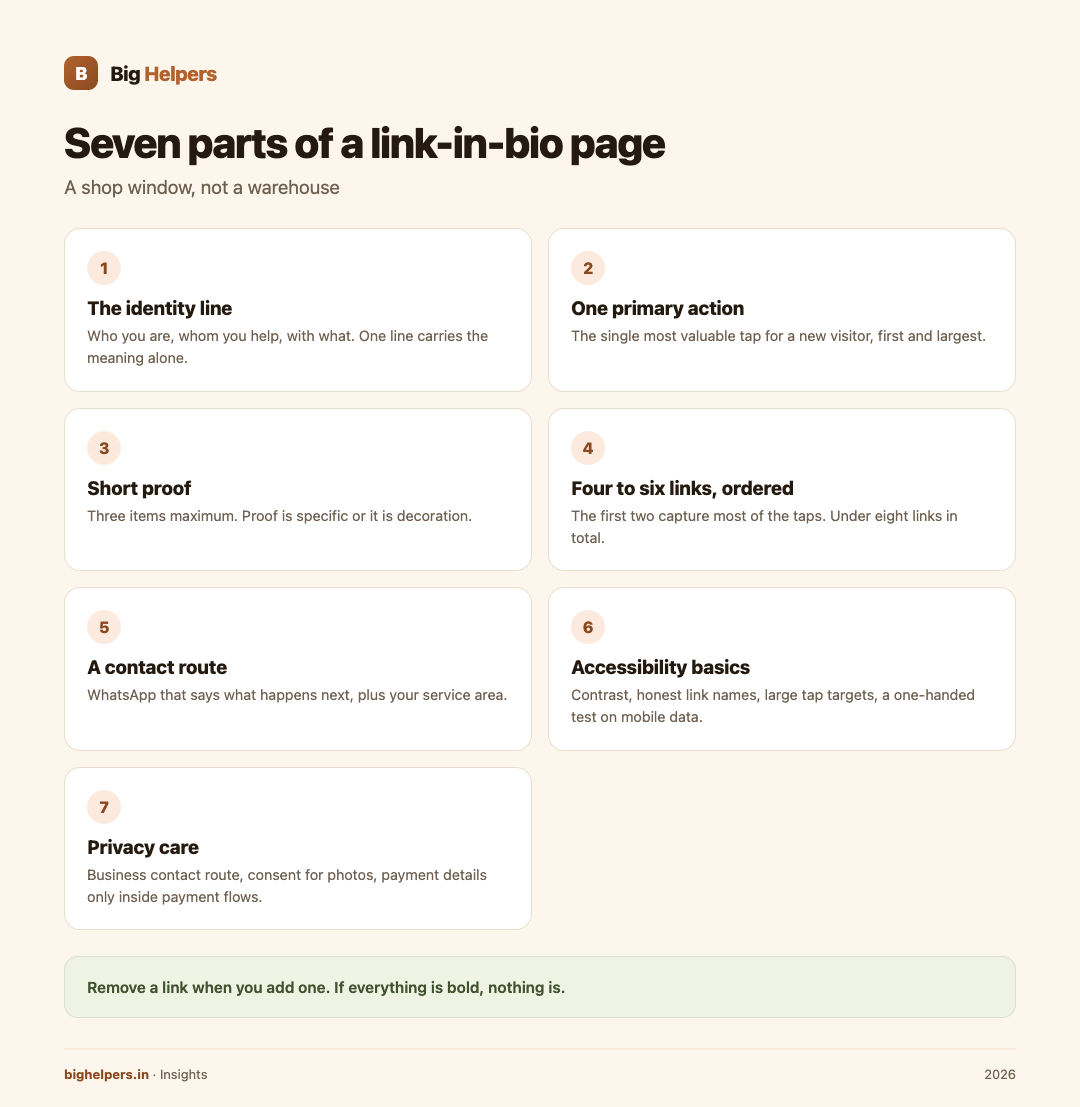
Build from seven parts, in this order.
Part 1: The identity line
One line: who you are, whom you help, with what. "Evening yoga classes for working women in Chennai." "Baked treats for parties across Pune." If a first-time visitor cannot say what you do after reading this line, nothing below it will save the page.
Test it aloud. If it needs a second sentence, keep editing. Names and taglines are fine, but the sentence has to carry the meaning on its own.
Part 2: One primary action
Decide the single most valuable tap for a new visitor, and make that the first and largest button. Book a trial class. Order this week's menu. Join the waitlist. Subscribe.
One action, not three. Secondary actions live further down as ordinary links. The discipline of choosing one primary action is what makes the rest of the page honest: if everything is bold, nothing is.
Part 3: Short proof
Three items maximum: a one-line testimonial with a first name, a count you can defend ("240 classes taught"), a recognisable client or publication name, or three thumbnails of your actual work. Proof is specific or it is decoration. "Best baker in Pune" is a claim; "450 celebration cakes delivered" is a fact a reader can feel.
Part 4: Four to six working links, in order
List links in the order a newcomer should meet them, because the first two capture most of the taps:
- The primary action.
- The main catalogue or portfolio.
- Recent or featured work.
- How to contact or book.
- Optional: one social profile where you are most active.
Under eight links total, always. Every extra link divides attention and hides the ones that matter. Remove a link when you add one.
Part 5: A contact route that fits the audience
For most Indian creators and small businesses, that route is WhatsApp, and it works best when it says what happens next: "Message on WhatsApp for orders, replies by 8 pm." State your service area or delivery range here too, so half your enquiries do not arrive from cities you cannot serve.
Part 6: Accessibility basics
A page nobody can read is a broken page. Six checks, once, at setup:
- Text contrast strong enough to read on a bright phone screen outdoors.
- Link names that say where they go, never "click here".
- Large tap targets, roughly a finger's width, with space between them.
- No meaning carried by colour alone.
- A legible font size; if seniors are your audience, go larger.
- Test the page one-handed, on a budget phone, on mobile data.
Part 7: Privacy care
- Use a business or professional contact route, not your home address.
- A personal number is a real cost: it will be screenshotted and forwarded. Prefer WhatsApp Business on a separate number where possible.
- Photos of children, clients or students need consent before they become proof.
- Do not list your full client list or pricing you would not defend publicly.
- Keep payment details to payment links or in-chat flows, never as bare text on a public page.
Two example pages
Lakshmi, yoga teacher, Chennai. Identity: "Evening yoga for working women, Adyar and online." Primary action: "Book a trial class". Links: class timetable, this month's batch photos, WhatsApp contact, one testimonial strip. Six tappable things in total.
Irfan, home baker, Pune. Identity: "Celebration cakes and party boxes, baked to order." Primary action: "Order this week's menu". Links: menu with prices, delivery areas, allergy note, WhatsApp. Proof: one line, "450 cakes delivered". Nothing else.
Both pages answer who, what, where and what next, in under ten seconds.
Where YourLinks fits
YourLinks is a Big Helpers product. The Big Helpers apps page describes it as "A creator workspace for publishing and managing a link-in-bio page", with availability "Available on iOS. Android is in controlled testing."
Verified on 29 August 2026, from the App Store listing and the product site:
- The iOS app lets you sign in to your creator workspace, create a page, choose a handle, review page identity details, and preview the public profile with featured links, social destinations, collections and supported content blocks, on iPhone.
- The App Store privacy label for the app states "Data Not Collected" from the app.
- The product site, yourlinks.in, positions it as "one link that grows your audience" for creators, businesses and coaches, with links, file sharing for menus and guides, subscriber capture by email form, coupon codes, QR codes, WhatsApp integration, page analytics showing clicks, downloads, subscribers and trends, and version history. The site says it is in a free worldwide beta, with no card and no purchase flow, and that it is built in India by Big Helpers.
None of the seven parts above require YourLinks; a simple page anywhere, kept honest and short, does the job. YourLinks is one workspace that publishes and manages the page and previews it on your phone, which matters when most of your audience arrives from a phone bio.
For the wider picture, the creators page covers portfolio sites for people selling work, the content marketing guide for Indian SMEs explains what to expect from content effort, and SEO and LLM optimisation helps the page get found beyond your bio.
Frequently asked questions
How many links are too many?
Past eight, drop-off is sharp because the page stops being readable at a glance. Rotate links by season instead of stacking them.
Should prices be on the page?
Ranges or "from" prices qualify buyers and save messages. Exact prices for custom work belong in the chat where you can ask questions.
Bio link or website?
They serve different moments. The bio page is the front door for social visitors; a website carries depth, search traffic and long-form trust. Many creators run both, with the bio page linking to the site.
What must never go on the page?
Home address, personal ID numbers, bare bank details, children's photos without consent, and any client's details you did not ask permission to show.
What is YourLinks exactly?
A creator workspace for publishing and managing a link-in-bio page, built by Big Helpers. The iOS app is publicly available and previews the public page; the web platform at yourlinks.in is in a free beta. Its site lists file sharing, coupon codes, QR codes, subscriber capture, WhatsApp integration, analytics and version history.
Does the page work for small organisations, not just creators?
Yes. A tuition centre, clinic or community group needs the same seven parts: identity line, primary action, proof, ordered links, contact route, accessibility and privacy care.
What to do next
YourLinks is available on iOS. Android is in controlled testing. To manage and preview your page from an iPhone, see YourLinks on the App Store. The web workspace is at yourlinks.in, currently free during the beta, with no card needed. Android users can join the Big Helpers interest list at bighelpers.in/apps and choose Android as the platform.
Sources & references
- Big Helpers apps page - app descriptions, availability status and waitlist details, checked 29 August 2026.
- YourLinks on the App Store - app capabilities and privacy label, checked 29 August 2026.
- yourlinks.in - workspace features, free beta terms, checked 29 August 2026.
Pricing in this guide is verified as of the article date. Verify with vendors before committing budget — rates change quarterly.