
Enquiries scattered across numbers?
Plan a shared inbox with the context, assignment and branch routing your team needs.
Custom CRM · WhatsApp integration · Multiple centres
Bring your company's enquiries, WhatsApp conversations and follow-ups into one shared system, built around the way your teams work.
Give each centre its own queue. Give every enquiry a responsible person. Give management a view across the business.
When your business works across locations
Plan a shared inbox with the context, assignment and branch routing your team needs.
Put the next action, responsible person and due date alongside the customer record.
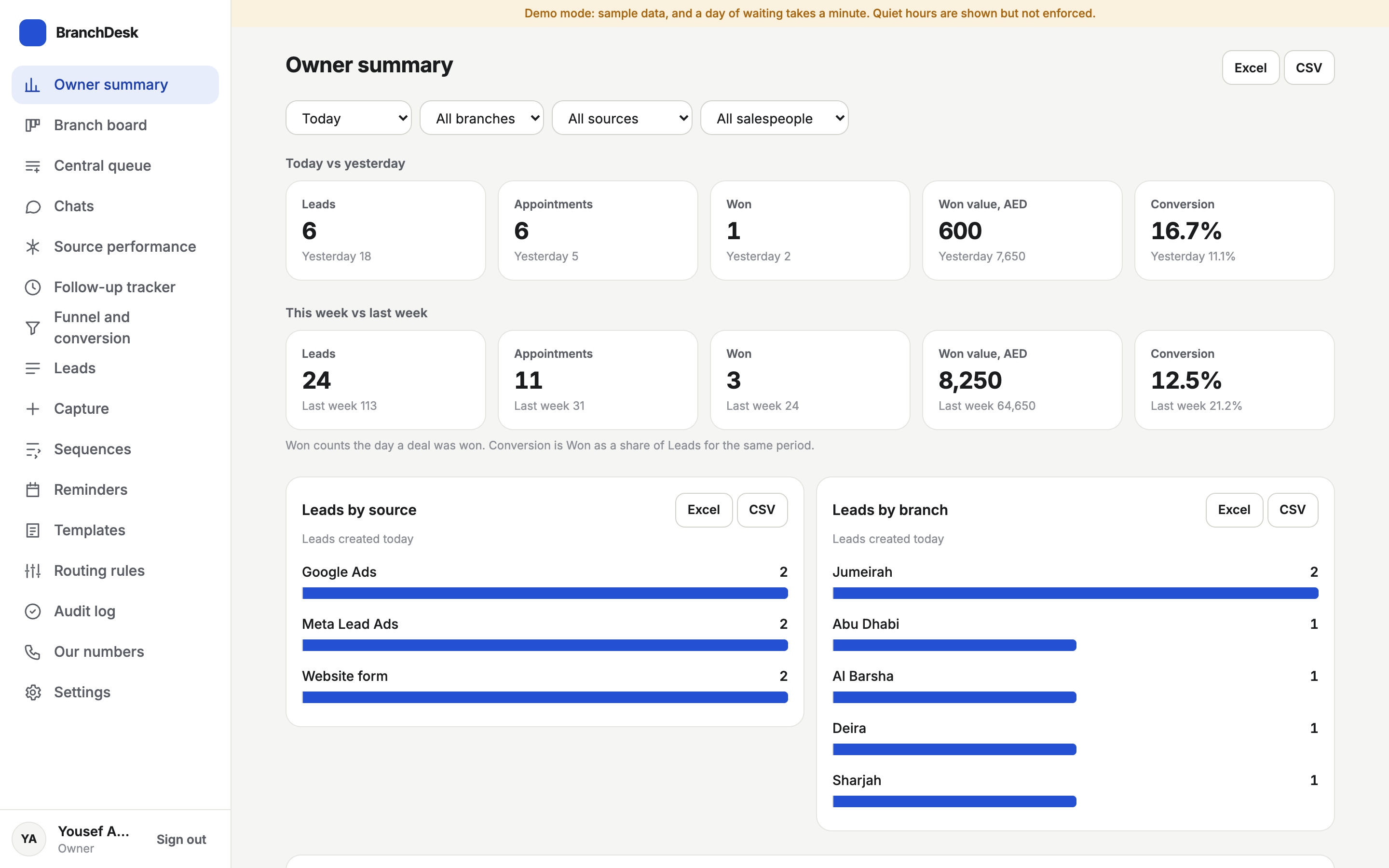
Define a management view across locations, sources, workloads and sales stages.
Inside our portfolio: BranchDesk
A WhatsApp-first CRM demonstration for a central desk and seven branches. It shows how one organisation can coordinate enquiries from first contact to outcome.
The seven-branch setup is an example configuration. Names and business figures are sample data. Live and sample connections are identified within the guided demo. Your deployment is scoped for your organisation.
At the desk. At the centre. On the move.
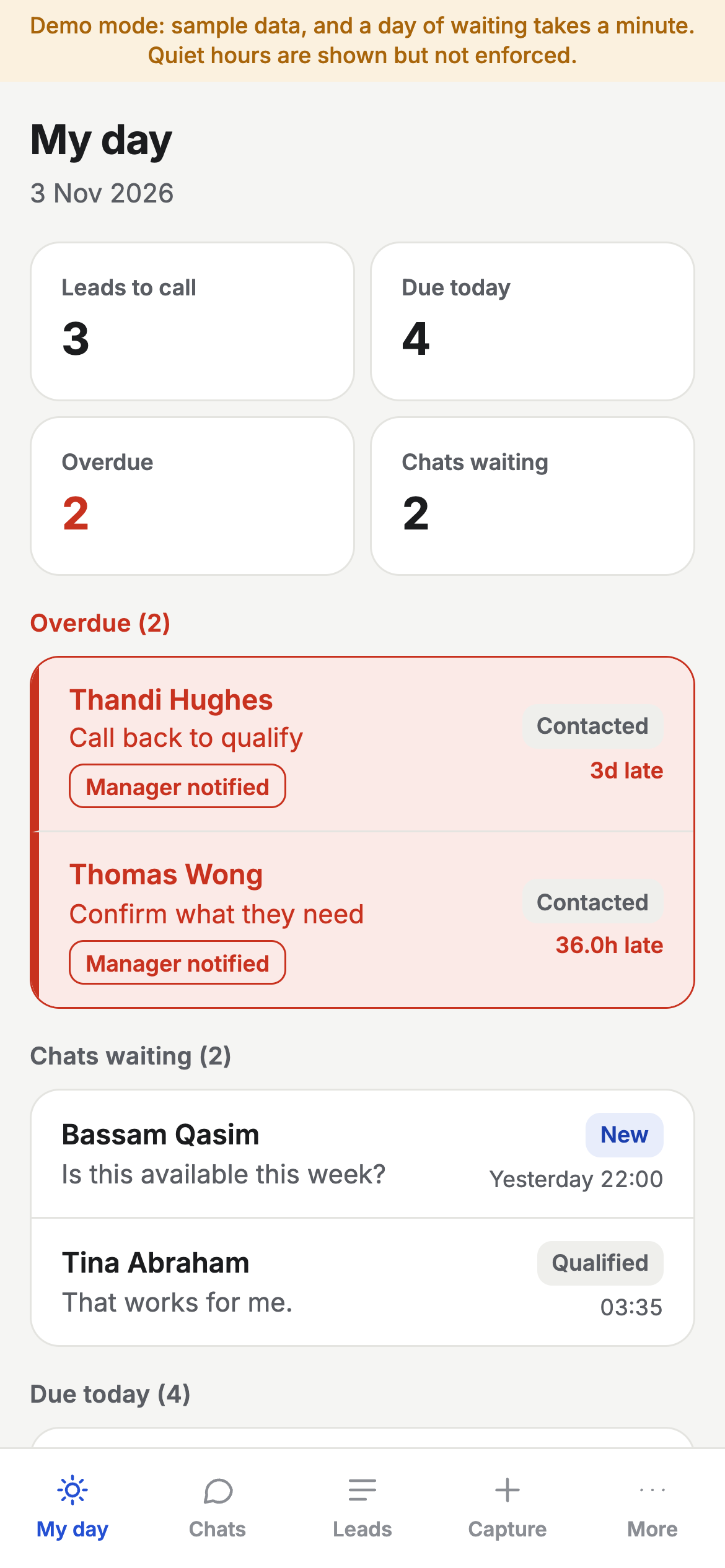
BranchDesk's phone view brings due actions, overdue follow-ups and waiting chats together. Managers have a branch view; owners have a view across locations.
A walkthrough for your team
Our narrated BranchDesk walkthrough covers capture, WhatsApp handover, routing, mobile follow-ups, manager oversight and reporting in just under eight minutes.
This is BranchDesk: one WhatsApp-first CRM for a central desk and seven branches. Let's walk through it, one feature at a time.
Every lead follows the same path. It starts with an enquiry, from a form, an ad, a walk-in, a call or a WhatsApp message.
Within seconds, the customer gets an automatic reply.
The lead is routed to the right branch, by rules, or by the central desk.
A salesperson follows up, helped by reminders and automatic sequences.
The lead ends as won, with its value, or lost, with the reason.
And everything feeds the owner's reports.
Five roles share one system.
Yousef, the owner, sees every branch and every report.
Neha, on the central desk, places the chats the rules can't.
Aisha runs one branch, and steps in when follow-ups run late.
Omar, a salesperson, works his leads and chats from his phone.
And Grace, the CRM admin, looks after rules, numbers, templates and settings.
Chapter one. Leads come in. Every enquiry, from every source, lands in one place.
It starts on your website. A customer opens the enquiry form.
They choose the service they want, and the area they're in.
If they tick the box, their consent to WhatsApp offers is saved with the lead.
They press send, and the lead is in BranchDesk straight away.
Not every customer comes online. Walk-ins and phone calls go in through Quick capture.
Pick the branch, and how they reached you: walked in, or phoned.
Add their name, phone, the service and a short note, and save.
Every lead, whatever the source, sits in one list.
Filter it by date, branch, source or salesperson.
If someone enquires twice, the repeat joins their existing record. No duplicates.
And any list can be exported to Excel or CSV.
Chapter two. WhatsApp answers in seconds.
Here's one chat, start to finish. The moment the customer writes, an automatic reply goes out.
BranchDesk routes the chat: to the Jumeirah branch, then to Omar.
The point where Omar takes over from the bot is clearly marked.
And the twenty-four hour reply window is always shown, so nobody misses it.
Chapter three. Routing to the right branch.
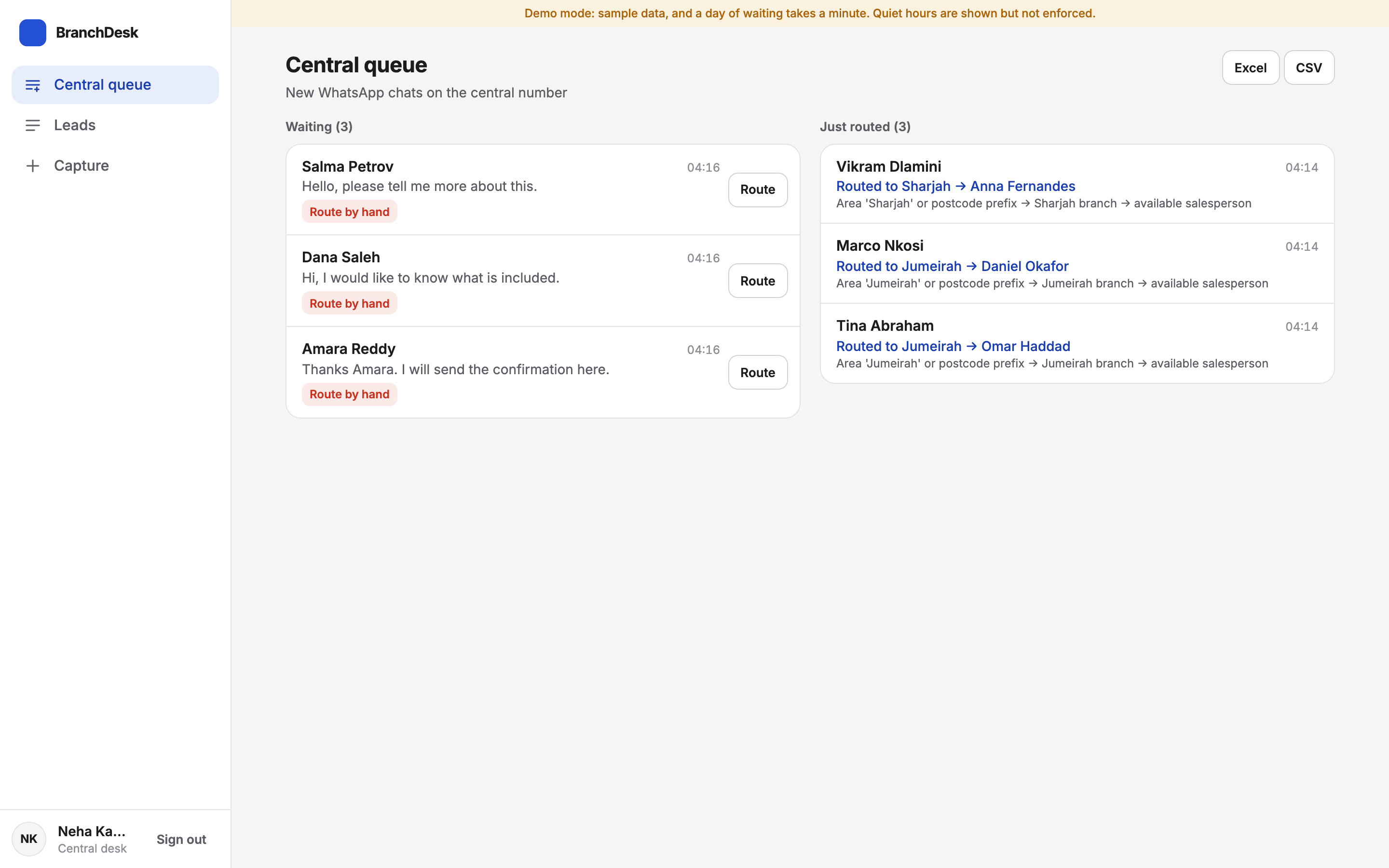
This is Neha's central queue. New chats on the central number arrive here.
When no rule can place a chat, it waits here for a person.
Neha routes it by hand, in one click.
Chats the rules did place show the branch, the salesperson, and the rule that chose them.
Routing rules are checked in order, for every new lead.
The customer's area, or postcode, decides the branch.
And within the branch, the least busy salesperson gets the lead.
Chapter four. Eight WhatsApp numbers, one inbox.
The business runs eight WhatsApp numbers: one central number, and one for each branch.
Live numbers show their status, straight from Meta.
When a customer writes to a branch number, the chat goes directly to that branch. No routing needed.
All of those numbers come together in one inbox.
Each chat shows which number it came in on.
And you see the reply window, the stage and the owner at a glance.
Chapter five. A salesperson's day.
Omar starts his day on his phone, on My day.
Overdue follow-ups come first, in red.
When one runs late, his manager is told automatically.
Below that, the chats waiting for his reply.
On a lead, he can call or WhatsApp the customer in one tap.
Moving the stage sets the next action for him.
He can enrol the lead in a follow-up sequence.
And the source, campaign and consent stay with the lead.
If a customer walks into the branch, Omar captures them right there.
The lead stays with him, as his own.
Chapter six. The full record.
Here's a lead that was won, with the value of the deal.
Its follow-up sequence stopped by itself the moment it was won.
The appointment is marked as attended.
And the campaign and ad click are kept, so reports know where the sale came from.
Chapter seven. The branch manager.
Aisha manages a branch. Her board shows new, unassigned and overdue leads at a glance.
Plus today's appointments.
Nudges tell her when a salesperson is running late.
She can reassign a lead, and every change is logged.
Chapter eight. Follow-ups on autopilot.
Sequences send follow-up messages on their own.
You can see who replied, who opted out, and who finished.
Inside a sequence, the steps are spaced out over days.
Quiet hours mean nothing is sent between nine at night and nine in the morning.
And it stops the moment the customer replies.
Reminders cover every appointment in the next three days.
Each reminder goes out by itself.
Messages sent after the twenty-four hour window must be templates that Meta has approved.
If Meta rejects one, you see the reason.
Chapter nine. Reports.
Yousef starts with the owner summary: today, against yesterday.
Leads, appointments, won value and conversion.
Broken down by source, and by branch.
Source performance shows which sources bring business that's actually won.
With ad spend and cost per lead, side by side.
The follow-up tracker shows how fast the automatic reply goes out.
How soon a person replies.
And which follow-ups are due, or overdue.
The funnel shows won, lost and conversion for the period.
And how far leads got, stage by stage.
Chapter ten. Control.
Settings show how the whole system is connected.
Including every WhatsApp number, live or sample.
And the audit log records every routing and every reassignment.
Filter it by what happened, to find any change.
From the first message to a won deal. One CRM, every branch, every WhatsApp number. That's BranchDesk.
Built around your company
Agree locations, teams, access levels, assignment rules and escalation paths.
Scope official WhatsApp Business Platform connections, website forms and other available lead-source integrations.
Define sales stages, next actions, reminders, follow-up sequences and staff handover.
Choose how to compare locations, lead sources, response times, workload and outcomes.
Review booking, finance and other systems. Confirm API access and feasibility before promising a connection.
Agree source-code ownership, data export, hosting, documentation, training and ongoing support.
Implementation, hosting, support and third-party messaging costs are itemised in the proposal. WhatsApp connections depend on account access, provider availability, consent and applicable platform requirements.
Is this the right starting point?
Bring us the workflow for your branches, service centres, sales offices, training centres or franchise locations. We will assess what can be shared centrally and what each centre needs to control.
We can assess a central number, branch numbers or a combination. Existing number eligibility, account ownership and connection requirements are reviewed before implementation.
We agree role and location access during discovery. BranchDesk demonstrates different workspaces for the owner, central desk, branch manager, salesperson and administrator.
Yes, we can scope records, terminology, stages, appointments and reports around your workflow. Industry-specific requirements and integrations are assessed before a proposal is agreed.
BranchDesk is a working example using sample business data. Your configuration, integrations, testing, migration, training and rollout form a separate agreed scope.
Tell us how many centres and staff you have, which WhatsApp numbers and lead channels you use, and what currently gets missed. We can then arrange a guided demo and scope the first useful phase.
Let's map your workflow
Tell us your number of centres, team size, current tools and where follow-ups get stuck. Start with a non-confidential outline.
Built in India. Worldwide enquiries welcome. Custom scope, clear costs and code your company owns.