
Short answer
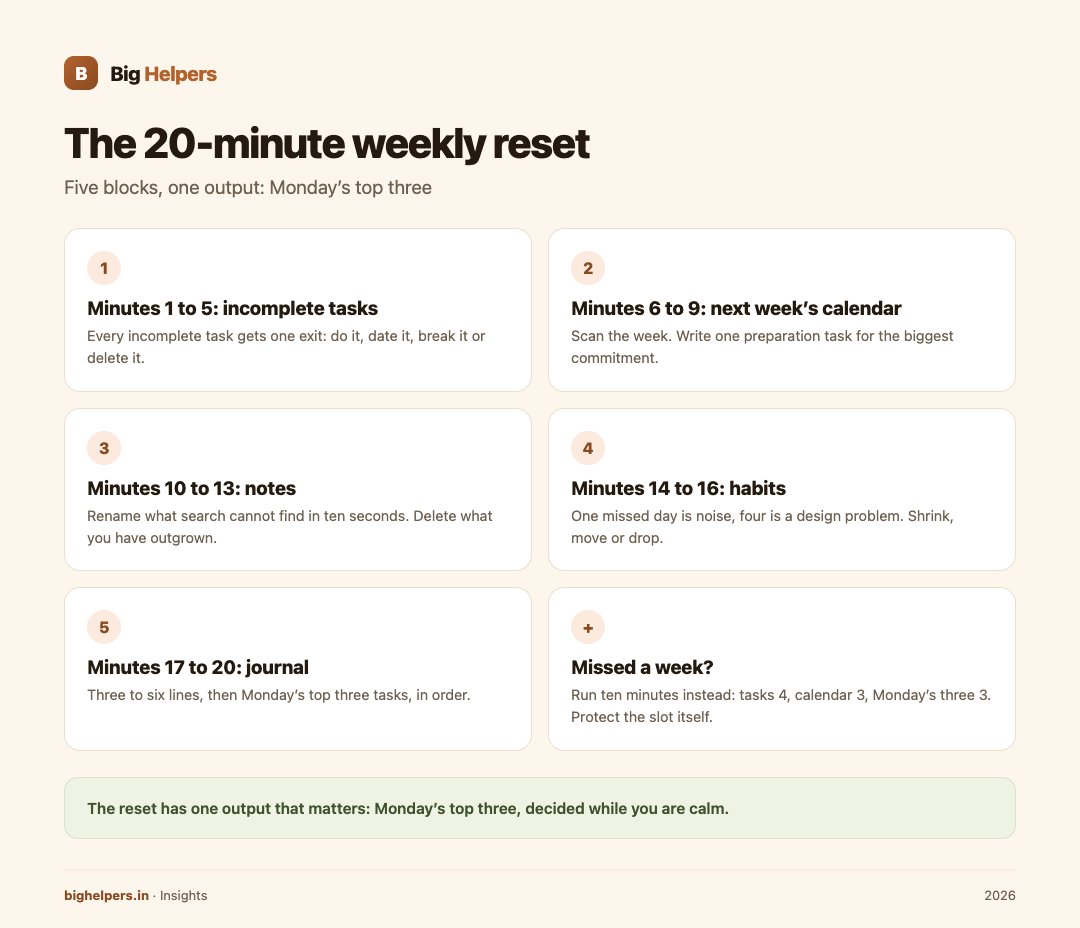
Fix one 20-minute slot at the same time every week. Spend five minutes on incomplete tasks, four on next week's calendar, four on notes, three on habits, and four on a short journal entry that ends with your top three tasks for Monday. Do it on paper or in any app; the value comes from the rhythm, not the tool. Taskss is one workspace that holds all five lists in an offline-first app, available on iOS today.

Why 20 minutes, and why weekly
A system you never review is a junk drawer. A review that takes an hour is a meeting with yourself, and meetings get skipped. Twenty minutes is short enough to protect and long enough to matter, and once a week matches how fees, classes and deadlines already run.
The reset has one output that matters: Monday's top three tasks, decided while you are calm. Everything else is preparation for that decision.
Before you start: the two-minute setup
- Pick the slot and keep it. Sunday evening works for most people; Friday at 6 pm works for shop owners who rest on Sunday. Put it in the calendar as a repeating event.
- Keep five windows ready: tasks, calendar, notes, habits, journal.
- Silence the phone except for the app you are using.
- One rule: if a thought is not about the current block, write it in the right list and move on.
The agenda, block by block
Minutes 1 to 5: incomplete tasks
Open last week's task list. For every incomplete item, choose one of four exits:
- Do it now if it takes under two minutes, such as replying to a pending message.
- Date it if it still matters; give it a real day next week.
- Break it if it keeps slipping because it is too big; split off only the first physical action.
- Delete it if it has slipped three weeks running. Guilt is not a reason to keep a task.
Aim to end this block with an empty "last week" view, not a perfect conscience.
Minutes 6 to 9: next week's calendar
Scan next week's month or week view. Look for three things: fixed commitments you must prepare for, clumps of three or more events in one day, and empty days you can claim for deep work. Write one preparation task for the biggest commitment. Example: if a school meeting is on Wednesday, the task is "print progress sheets Tuesday evening", not "prepare for meeting".
Minutes 10 to 13: notes
Search two terms you know you used recently, such as a client name or "format". If a note cannot be found in ten seconds, rename it now. Delete notes you have outgrown. If any note has become a routine, for example a checklist you follow every week, turn it into a template if your tool supports one, or mark it clearly as a master copy.
Minutes 14 to 16: habits
Look at the week's ticks, honestly. One missed day is noise; four missed days is a design problem. For each failing habit, choose: shrink it (ten minutes to five), move it (6 pm to 7 am), or drop it. A habit you keep renegotiating with yourself is costing you the trust the streak was supposed to build.
Minutes 17 to 20: journal, then Monday's three
Write three to six lines, using any of these prompts:
- What actually worked this week, and will I repeat it?
- What took longer than it should have, and why?
- What am I avoiding, in one honest sentence?
- What did people thank me for?
- If next week could only produce one result, what should it be?
Then close the journal and write Monday's top three tasks, in order. Not ten. Three. These are the commitments the whole reset exists to produce.
Arjun's reset, once, in real time
Arjun is preparing for bank exams in Vijayawada and studies around a part-time job. His Sunday 8 pm reset looks like this.
Minutes 1 to 5: eight incomplete tasks. He replies to one message (do), dates "download admit card" to Monday (date), splits "finish reasoning chapter" into "solve 20 syllogism questions Tuesday" (break), and deletes "research alternative coaching" after three weeks of slipping (delete).
Minutes 6 to 9: Wednesday has a mock test at 11 am. Preparation task: "charge calculator and reach centre by 10:15". He also notices Saturday is empty and books it for a full-length paper.
Minutes 10 to 13: he renames a note from "stuff" to "quant formula shortcuts v2" and deletes two stale news-app notes.
Minutes 14 to 16: his "revise current affairs daily" habit ran only twice. He shrinks it to one selected summary per day, ten minutes, at breakfast.
Minutes 17 to 20: journal lines: quant accuracy is up, sleep is down. Monday's three: download admit card, 20 syllogism questions, one current-affairs summary at breakfast.
Twenty minutes, and the week is already decided at the top.
When you miss a week
Do not punish the system. Run a ten-minute version instead: tasks (4 minutes), calendar (3), Monday's three (3). Skip notes and habits. The habit you are protecting is the slot itself, not the full agenda. Two missed weeks in a row means the slot is wrong; move it rather than fight it.
Where Taskss fits
The reset works on paper. It also works well in one workspace that already holds all five lists, which is what Taskss is. The Big Helpers apps page describes Taskss as "Offline-first tasks, notes, habits and a private journal in one place", with availability "Available on iOS. Android is in controlled testing."
From the App Store listing, verified 29 August 2026: Today, Upcoming and Browse views for tasks; month, week and day calendar views beside tasks; notes in folders with locks; habits with daily, weekly or custom cadences and honest streaks; and a journal the listing says is encrypted on your device with a passphrase only you know. The listing also says the app works offline and syncs when you are back, has no advertisements or tracking, and is free while in beta.
None of that changes the method. The reset is the method; Taskss is one place to run it, and its offline behaviour means the Sunday slot survives even when the Sunday wifi does not.
Readers who want the surrounding habits of a working week may also like the local business guide, and those weighing a purpose-built app against lighter tools can read the custom mobile app versus WhatsApp bot comparison.
Frequently asked questions
Sunday evening or Friday evening?
Whichever you will actually keep. Sunday gives a fresher plan for Monday; Friday gives a freer weekend because the week is already closed. Teachers and shop owners often prefer Friday; students usually prefer Sunday.
What if 20 minutes is not enough?
Cap it anyway. Overflow means capture is messy during the week, not that the reset is too short. Fix the weekday habit, not the meeting length.
Can I do this on paper?
Yes. Five labelled pages in one notebook cover everything except automatic habit streaks. Paper fails only on search, which is why digital notes earn their place for reference material.
What do I do with tasks that survive every reset?
Delete them or shrink them. A task that survives three resets is either a wish or a project wearing a task's clothes. Turn it into a project with a first physical action, or let it go.
Is the journal private in Taskss?
Per the App Store listing, the journal is encrypted on your device with a passphrase only you know, and the maker states it cannot read it. Choose a strong passphrase; it is the actual lock.
Does the reset replace daily planning?
No. Daily planning picks the order of the day; the weekly reset decides what deserves to be on the week at all. The reset takes fifteen minutes on Monday morning away from you, because Monday's three are already written.
What to do next
Taskss is available on iOS. Android is in controlled testing. If you run your week on an iPhone or iPad, see Taskss on the App Store. If you are on Android, join the Big Helpers interest list at bighelpers.in/apps and select Android. The interest list is an update list, not a download or a release-date promise.
Sources & references
- Big Helpers apps page - app descriptions, availability status and waitlist details, checked 29 August 2026.
- Taskss on the App Store - offline behaviour, journal encryption, features and beta pricing, checked 29 August 2026.
Pricing in this guide is verified as of the article date. Verify with vendors before committing budget — rates change quarterly.