
Short answer
Treat any synced clipboard as a public surface. Never copy passwords, OTPs, card and bank details, Aadhaar or PAN numbers, client documents or work secrets across devices through a clipboard that syncs. Use a password manager for credentials, read before every paste, clear the history regularly, and lock every device. If you reuse text across devices, keep it to non-sensitive material. Copio, from Big Helpers, is a privacy-first clipboard in early access.
The copy-paste habit you never audited
Copying something on the phone and pasting it on the laptop is now a reflex. An address, a UPI ID, a code from a message, a paragraph for a client. The clipboard feels private because it sits on your own devices.
The trouble is what the clipboard is: a temporary store with no lock, no expiry discipline and no idea what it holds. When a clipboard syncs across devices, or an app reads it to be helpful, everything you copied last is in play. Most of the time that is harmless. The audit matters for the times it is not.
One rule before any tool discussion: the more a piece of text is worth to a stranger, the less it should ever touch a shared clipboard.
The never-sync list
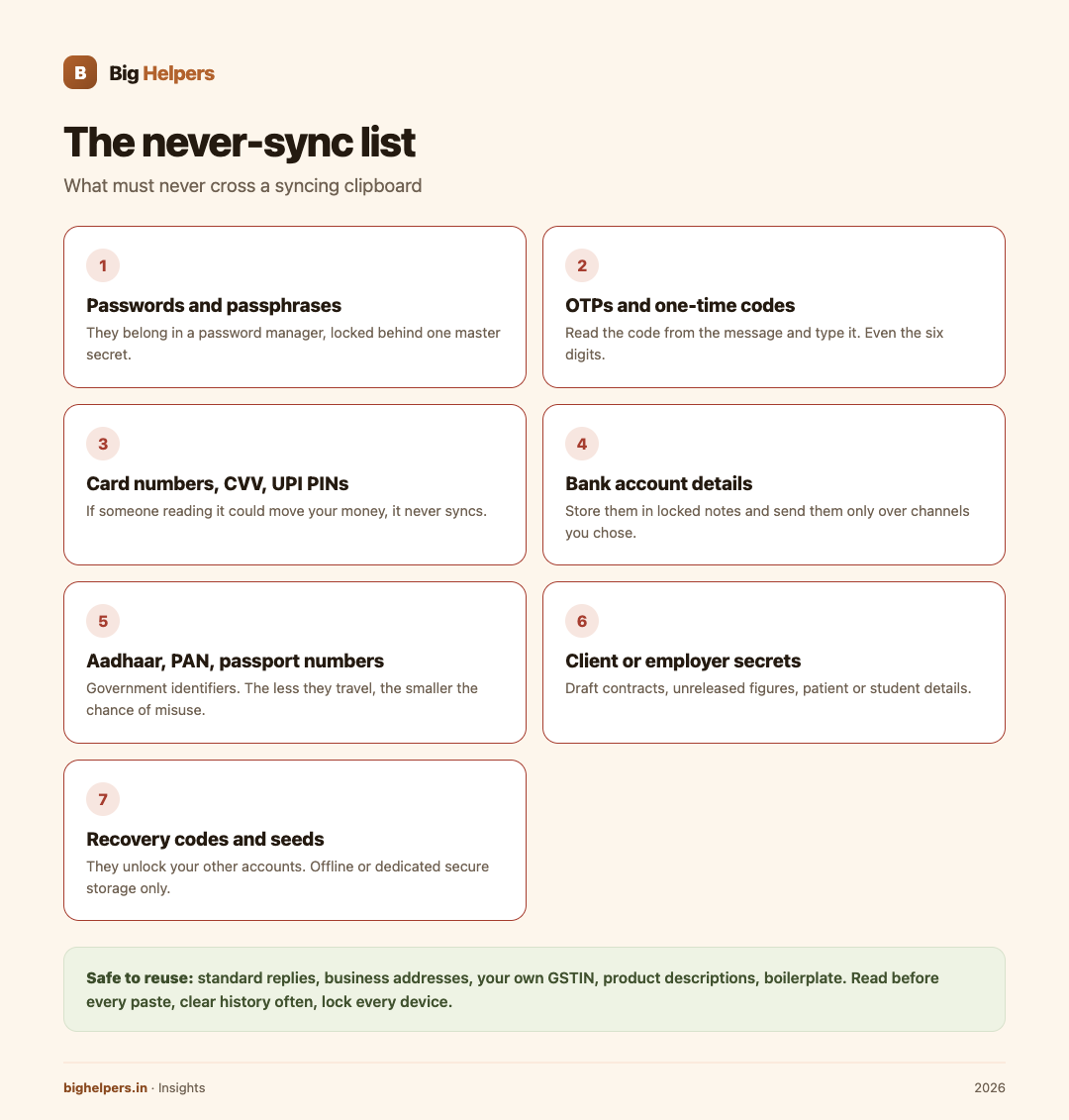
Passwords and passphrases. Belong in a password manager, which locks them behind one master secret. A clipboard copy can outlive the paste in history, in sync queues and in screenshots.
OTPs and one-time codes. An OTP is powerful for minutes and useless afterwards, which is exactly why clipboard history keeping it is pointless and risky. Read it from the message and type it. Yes, even the six digits.
Card numbers, CVV, expiry, UPI PINs. If someone else reading it could move your money, it never crosses a syncing clipboard. Type card numbers at checkout or use the bank's own saved-instrument flow.
Bank account details tied to your name. Needed often, but they identify you financially. Store them in your notes behind a lock, not in a clipboard that syncs, and send them only over channels you chose.
Aadhaar, PAN, passport numbers. Government identifiers that anchor your identity. The less they travel, the smaller the chance of misuse.
Client or employer secrets. Draft contracts, unreleased figures, source code, patient or student details. Syncing these across personal devices can breach confidentiality obligations even when nothing leaks, because you rarely control every device in the chain.
Recovery codes and backup seeds. The codes that unlock your other accounts. They belong in offline or dedicated secure storage, never in copy-paste flows.
The sometimes list, with conditions
- Home address. Fine for delivery convenience if the clipboard does not sync history long-term. Avoid if the same device is shared at a shop counter.
- Personal phone number. Acceptable; still better kept in a contacts app and pasted from there.
- Meeting or class links. Usually fine; many expire anyway.
- Photos of documents. Not clipboard material at all. Keep them in the gallery behind a lock, or better, only when genuinely needed.
The safe list
Standard replies, business addresses, GSTIN of your own firm, product descriptions, tracking formats, boilerplate paragraphs, headings you reuse, code snippets without credentials. These are what cross-device copy-paste was made for, and where a dedicated tool earns its place.
Six hygiene rules that take one evening to set up
- Read before every paste. One glance at the preview. This single habit stops most wrong-window accidents, such as pasting a customer's address into a family group.
- Turn on auto-clear. Set the clipboard history to clear in the shortest offered window. Long history is convenience you are paying for with risk.
- Lock every device. Phone, laptop, tablet. A synced clipboard is only as private as the most unlocked device in the chain.
- Separate work and personal profiles. If the office laptop is managed, assume its clipboard policy is not yours to control and keep personal flows off it.
- Audit what syncs. For every tool that touches your clipboard, check its settings page once: what is stored, for how long, and where. If the answer is not written down anywhere, treat the tool as storing everything.
- Never paste into an unknown window. If a site or app asks you to paste "the code from your message", that flow should be typed, not pasted.
If you pasted something sensitive in the wrong place
Act in this order:
- Change the credential first. Password or PIN compromised, change it at the source before anything else.
- Clear the clipboard history on every device in the chain, then check the sync settings that let it spread.
- Revoke sessions. For the affected account, sign out all sessions from its security settings.
- Watch the money. For bank-related mistakes, check statements and enable transaction alerts if you have not.
- Tell the affected person. If the slip exposed a client's or student's data, a same-day note limits the damage and keeps trust.
Where Copio fits
Copio is a Big Helpers app in the productivity cluster. The Big Helpers apps page describes it as "A privacy-first clipboard for securely reusing text across devices", and marks it "Early access. Public store release is not yet available." There is no store listing to install today, and no public date for one.
That is the full extent of what can be verified right now. No feature specifics beyond that description have been published, so this article claims none: no encryption details, no sync mechanics, no device list, no pricing.
What can be said with confidence is on the same apps page. The waitlist form collects only your email, an optional name and your platform choice, and the page states: "No app-health, clipboard, email, route, household or vault content is collected." The interest list is described as "not a store download, tester approval or guarantee of a release date." The waitlist privacy notice spells out how the submitted details are used.
Readers assessing clipboard-adjacent risk for a small team may also find the DPDP compliance guide for Indian websites and the data residency in India explainer useful for the wider question of where sensitive text ends up living.
Frequently asked questions
Is a syncing clipboard ever safe?
For non-sensitive, reusable text, yes, provided history is short, devices are locked and you read before pasting. The safe list above is the boundary. Everything on the never-sync list needs a purpose-built home.
Why is an OTP risky to copy? It expires anyway.
The code expires; the copy in a history or sync queue does not necessarily expire at the same moment, and the paste target may not be the one you intended. Reading and typing six digits costs five seconds.
What about password manager autofill versus copy-paste?
Autofill is the safer flow because the secret is handed directly to the matching app or site and does not sit in a general clipboard. Copy-paste from a manager is the fallback, not the default.
Do I need to clear history if only I use my devices?
Yes, because loss, service visits and shared moments exist. A stolen unlocked phone with a month of clipboard history is a preventable disaster.
What is Copio, exactly?
A Big Helpers app described on the apps page as "A privacy-first clipboard for securely reusing text across devices." It is in early access with no public store release yet. Feature details are not published, so verify from Big Helpers when it launches rather than from third-party summaries.
How do I join the Copio waitlist?
Use the interest form on the Big Helpers apps page, choose your platform, and you will receive release notices for Copio only. No clipboard content is collected by the form, per the notice on that page.
What to do next
Copio is in early access. Public store release is not yet available. If reusing text across devices safely describes a problem you have, join the Big Helpers interest list at bighelpers.in/apps and select Copio with your platform choice. Joining is not a download and not a release-date promise; it means you hear first when there is something real to install.
Sources & references
- Big Helpers apps page - app descriptions, availability status and waitlist details, checked 29 August 2026.
- App waitlist privacy notice - what the interest form collects, checked 29 August 2026.
- DPDP compliance guide and data residency explainer - wider context on where sensitive text lives.
Pricing in this guide is verified as of the article date. Verify with vendors before committing budget — rates change quarterly.