
Short answer
Build a small library of standard text you reuse every week: how you reply to a first enquiry, your service description, your meeting address, your payment steps and your handover checklist. Keep every snippet free of passwords, OTPs, client-confidential details and personal data you would not email a stranger. Name snippets consistently and review them quarterly. Copio, an early-access privacy-first clipboard from Big Helpers, is being built for securely reusing text across devices.
Snippets are salary by another name
Farhan is an independent HR and compliance consultant in Hyderabad. Counting one busy week, he typed the same first-reply paragraph eleven times, his office address nine times, and his scope summary six times. That is over an hour of retyping words he already owns.
A snippet is any block of text you use twice or more a week and expect to stay true for three months or longer. Writing it once, keeping it in one trusted place, and pasting it accurately is one of the cheapest productivity gains available to a consultant or a small team. The craft is in what you allow into the library, and what you keep out forever.
The admission test
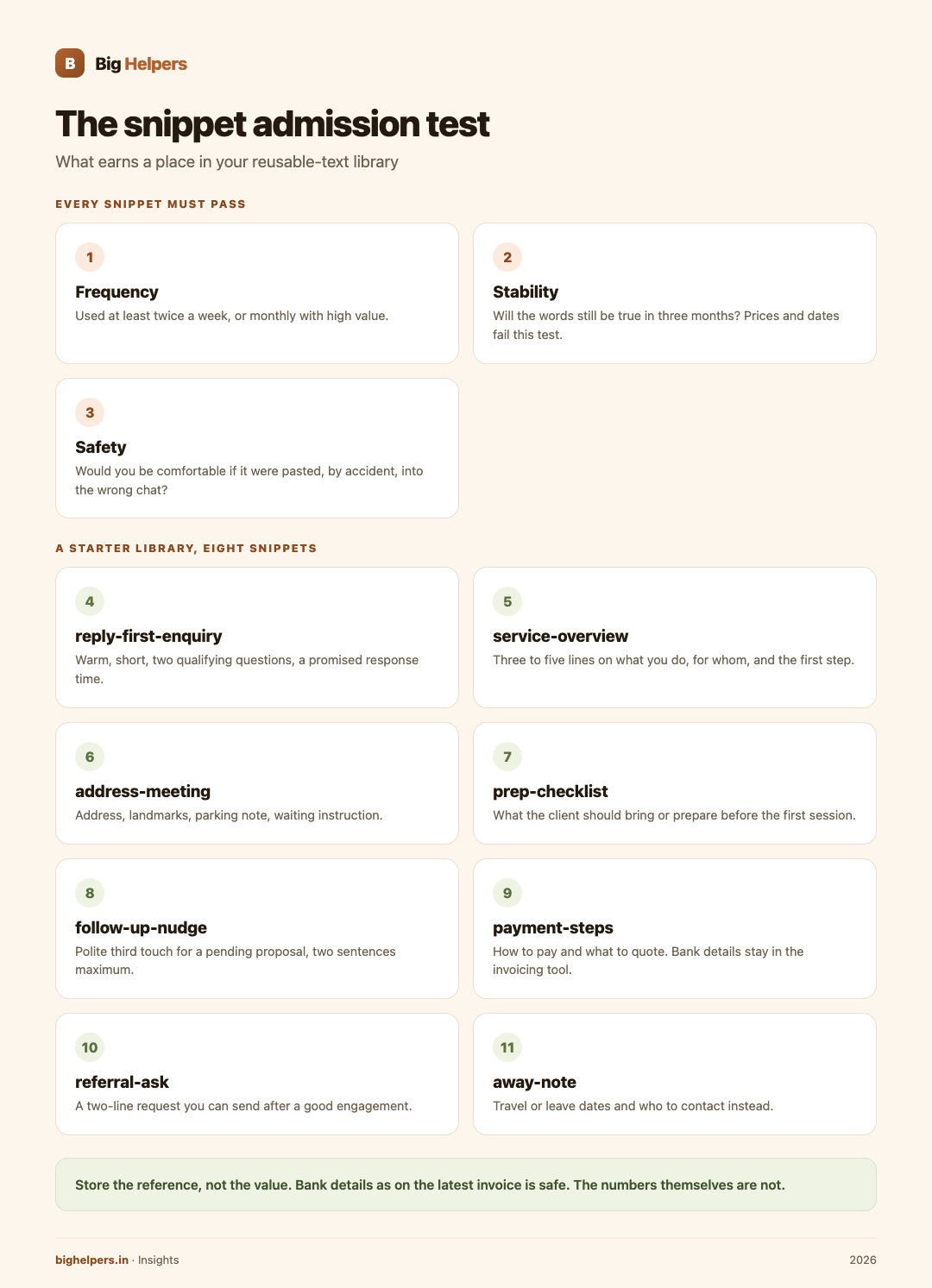
Before anything enters your snippet library, it must pass three questions:
- Frequency. Used at least twice a week, or monthly with high value, such as a renewal notice?
- Stability. Will the words still be true in three months? Prices and dates usually fail this test and belong in the snippet only as clearly marked blanks.
- Safety. Would you be comfortable if this text were pasted, by accident, into the wrong chat? If not, it does not belong in a snippet library at all.
A starter library for a solo consultant
Eight snippets cover most of Farhan's week. Use this as a template and adapt the names to your trade.
- reply-first-enquiry. Warm, short, asks two qualifying questions, promises a response time.
- service-overview. Three to five lines on what you do, for whom, and what the first step looks like.
- address-meeting. Office or video-call address, landmarks, parking note, waiting instruction.
- prep-checklist. What the client should bring or prepare before the first session.
- follow-up-nudge. Polite third touch for a pending proposal, two sentences maximum.
- payment-steps. How to pay, what reference to quote, when the invoice follows. Bank details stay in your invoicing tool, not pasted in chat.
- referral-ask. A two-line request you can send after a good engagement.
- away-note. Travel or leave dates and who to contact instead.
Notice what the list does not contain: anything with a password, a client's private information, or a number that changes monthly.
Safe versus never, in one view
Safe for a snippet library: standard replies, business addresses, service descriptions, preparation checklists, meeting instructions, disclaimers approved by you, formatting conventions, boilerplate you are licensed to reuse, your own GSTIN.
Never in a snippet library: passwords and passphrases, OTPs, card or banking credentials, client-confidential material, student or patient details, anything covered by an NDA, Aadhaar or PAN numbers of any person, recovery codes. These belong in purpose-built homes: a password manager for credentials, a locked record system for client data, and nowhere near a copy-paste flow.
If a snippet must reference something sensitive, store the reference, not the value. "Bank details as on the latest invoice" is safe. The details themselves are not.
Naming and upkeep
Prefix by job. Name snippets by what they do, not what they contain: "reply-first-enquiry", not "paragraph 2 final v3". Searchability is the whole point of naming.
One source of truth. Keep the library in one place per team. When two copies exist, the older one wins at the worst moment. Decide where the master lives, and let everywhere else be paste destinations only.
Mark the blanks. If a snippet has variable parts, use obvious brackets, for example [client name] or [amount], so nothing goes out unfilled. Read before sending; brackets are a safety net, not a substitute for eyes.
Quarterly review, fifteen minutes. Delete what died, update what drifted, and check nothing sensitive crept in during a busy month. Put it in the calendar; a library nobody reviews quietly becomes a risk.
Snippets in the tools you already use
You do not need a new tool to start. Email signatures and quick replies, saved WhatsApp Business greetings and away messages, and note templates each carry snippets today. Teams that send standard updates over WhatsApp can go further with approved message templates, which the WhatsApp Business API setup guide for Indian SMEs explains in detail. When a standard service line needs to become a formal document, a quoting tool keeps it consistent; BusinessSetu pricing shows how quotes and GST-format bills sit inside one subscription built for Indian small businesses. Consultants building a public face can also standardise the wording of their offer on a consultant website, and teams repeating the same office chore weekly may benefit from small business automation instead of more pasting.
Where Copio fits
For text that must travel between your phone and laptop, a general clipboard is the wrong shelf: it mixes your standard replies with whatever you copied last, including things that should never travel.
Copio is a Big Helpers app described on the apps page as "A privacy-first clipboard for securely reusing text across devices." Its status is "Early access. Public store release is not yet available", platform label "Waitlist first". There is no store listing to install today, and no further feature detail is published, so none is claimed here: no sync mechanics, no encryption specifics, no device list, no pricing.
What is verified is the waitlist itself. The form on the apps page takes an optional name, your email and your platform choice, and the page states: "No app-health, clipboard, email, route, household or vault content is collected." In other words, joining the interest list never involves handing over snippets or clipboard activity. The page also says the list is not a store download, tester approval or a release-date promise.
Frequently asked questions
Where should a two-person team keep snippets?
One shared note or document as the master, plus whatever paste shortcuts each person keeps locally. Review together each quarter so the master stays the truth.
How do snippets stay safe on a shared office device?
Keep only business-standard text in the library, lock the device, and keep the never-list out entirely. A shared device makes the read-before-paste rule more important, not less.
Can I put my bank details in a payment snippet?
Keep the payment steps as a snippet; keep the account details inside your invoicing or banking channel and send them only when needed, through a channel you chose. The snippet should point to the latest invoice, not carry the numbers.
What is the difference between a snippet library and clipboard history?
History is everything you copied recently, mixed and unmanaged. A snippet library is a small, named, reviewed set you chose. History is an accident log; a library is a decision.
What exactly is Copio today?
An early-access Big Helpers app, described as "A privacy-first clipboard for securely reusing text across devices", with no public store release yet. Details beyond that description are not published, so wait for Big Helpers' own release notes rather than third-party claims.
How do I hear when Copio is available?
Join the Big Helpers interest list at bighelpers.in/apps, select Copio and your platform. You get release notices for your selection only, and the form collects no clipboard content.
What to do next
Copio is in early access. Public store release is not yet available. Start your snippet library today in whatever notes app you trust; that work stands on its own. If you also want a purpose-built way to reuse text across devices, join the Big Helpers interest list at bighelpers.in/apps and select Copio. Joining is not a download and not a release-date promise; it means you hear from Big Helpers when there is something real to try.
Sources & references
- Big Helpers apps page - app descriptions, availability status and waitlist details, checked 29 August 2026.
- App waitlist privacy notice - what the interest form collects, checked 29 August 2026.
- BusinessSetu pricing - Core plan scope including quotes and GST-format bills, checked 29 August 2026.
Pricing in this guide is verified as of the article date. Verify with vendors before committing budget — rates change quarterly.