
In brief
Joining a waitlist should register interest in one product, not enrol you in a company's entire marketing universe. The Big Helpers app portfolio runs a single waitlist form for its early-access apps, and the page states the rule plainly: "Every selection is independent. Joining for one app does not subscribe you to all Big Helpers marketing." This guide walks through the live form as it stands on 29 August 2026, explains what you consent to under the waitlist privacy notice, and shows how to withdraw later. No form was submitted while writing this; everything below comes from the live page and its notice.
When you need the waitlist at all
Before touching any form, check whether you need it. Of the fourteen apps on the portfolio page, eleven have public App Store listings and Grihini additionally has a public Google Play listing. Those you simply install; no waitlist, no consent form, just the store's own process.
The waitlist exists for the three apps whose labels read "Early access": Copio ("Public store release is not yet available"), Harkara (same label) and KaryaYogi ("The app remains in testing and review lanes"). You can also join for any other app to hear about platform releases, such as the Android version of an app currently in controlled testing. That is a genuine second use: an Android user who wants Taskss can register interest today even though its Android build is not public.
What the form actually asks for
The live form is compact, and every part is worth understanding before you fill it in.
Your email address. This is the one required identity. It is the address your invite or product updates will reach, and it is also the address you will use to withdraw, so pick the one you actually read.
Your name, optional. The notice lists name under what is collected "if you choose to provide it". Skipping it is a legitimate choice, not an incomplete form.
The apps you select. Each app appears as its own card with its own checkbox labelled "Add" followed by the app name, for example "Add Copio". Selection is per app. The page also offers "Select all 14" and "Clear" buttons, which is exactly where accidental over-subscription happens: pressing select-all when you want one app signs you up for interest records across the whole portfolio. The honest default is to tick only the app or apps you would genuinely install.
Your platform preference. The page invites you to "choose Apple, Android or either platform". This is the consent most people rush. If you use only Android, choosing Android means your interest is tied to the release that matters to you; choosing either doubles the updates you receive for no benefit.
The privacy notice link. The form's agreement line points to the waitlist privacy notice. Reading it takes two minutes and is the difference between informed consent and surprise.
A hidden anti-spam check. The form includes an invisible abuse-prevention field that needs no action from you. It exists to stop automated submissions.
What you are consenting to
The waitlist privacy notice, effective 29 August 2026, is specific enough to quote on the points that matter.
The short version, in its own words: the company uses your details "only to manage the app interests you select and to send relevant release, beta and product updates", and "We do not sell waitlist data."
What is collected: your email, your optional name, the apps and platform you selected, the date, the consent notice version and the submission source, plus a one-way hash of your connection address and a limited browser description for spam protection. The notice states the raw connection address is not stored in the waitlist database.
What is not collected is listed just as explicitly: "We do not collect phone numbers, health information, clipboard content, email content, routes, household records, private vault content or in-app behaviour through this form." That sentence matters because the portfolio includes email, clipboard and vault products; the notice draws a line between joining a waitlist and using those apps.
How long data is kept: your contact and app-interest record lasts until you withdraw, or 24 months after the last relevant app update, whichever is earlier, unless law requires longer. The hashed anti-abuse record lasts up to 90 days.
Platform-by-platform consent decisions
Your platform choice should follow your real device life. Use this table before you tick anything:
| Your device situation | For the 11 apps with public iOS listings | For Grihini | For the 3 early-access apps | Platform to select |
|---|---|---|---|---|
| iPhone only | Install from the App Store; no form needed | Install from the App Store | Join the waitlist | Apple |
| Android only | Join the waitlist to hear about the Android release | Install from Google Play today | Join the waitlist | Android |
| Both devices | Install now; waitlist only if you want release news | Install on either store | Join the waitlist | Either, but expect updates for both |
| Deciding for a household | Each adult joins separately | Same | Same | Each person selects their own |
Two of those rows deserve a second sentence. An Android-only user joining for an app whose iOS version is already public is the classic waitlist case: the interest is real but the release does not exist yet for their platform. And "either platform" is convenient, but if only one device matters to you, selecting it keeps your updates cleaner, because a waitlist entry is a marketing-consent record about the person who submits it; one adult should not consent for the whole household.
How to withdraw or correct later
The notice gives two routes: email contact@bighelpers.in from the same address used to join, or use the data-deletion request. You can ask the company to confirm, correct or delete your waitlist data, or withdraw consent entirely. Two details deserve attention: removing a waitlist record does not affect any separate app account you may hold, and the notice governs waitlist data even where the main privacy policy differs, because it is the specific notice for this form.
Pre-submission checklist
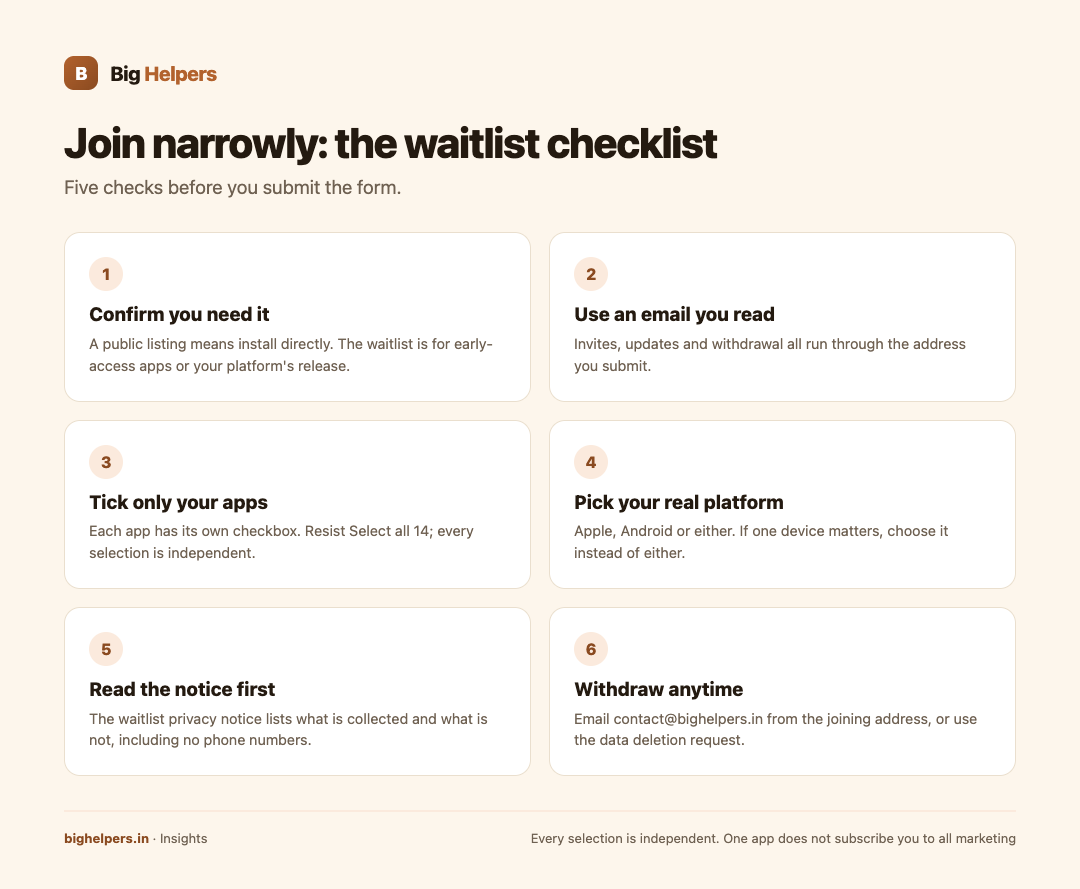
- Confirm the app is actually early access or awaiting your platform; install directly if a public listing exists.
- Use an email address you read and control.
- Tick only the app cards you want; resist "Select all 14".
- Choose your real platform, not "either", unless both truly matter.
- Read the waitlist privacy notice before submitting, not after.
Your next step
Open the apps portfolio page, read the waitlist privacy notice, then submit for exactly the apps and the one platform that matter to you. If a form anywhere refuses to let you choose narrowly, that refusal is your answer about the company behind it; this one does not.
Disclosure: the waitlist and this article's publisher are the same organisation, Big Helpers. The descriptions above come from the live form and notice as of 29 August 2026, with no submission made during preparation of this guide.
Frequently asked questions
Does joining the waitlist create an app account?
No. The notice describes recording interest to invite users to testing and send release updates. It is separate from any app account, and deleting the waitlist record does not touch app accounts.
Will I get marketing for all fourteen apps?
No. The page states every selection is independent, and the notice limits use to the app interests you selected.
Why is there a "Select all 14" button if selections are independent?
Convenience for people genuinely interested in the whole portfolio. For everyone else, individual selection is the safer default.
Is my IP address stored?
The notice states a one-way hash of the connection address is kept for abuse protection for up to 90 days, and the raw address is not stored in the waitlist database.
Can I join for an app that is already on the App Store?
You can, typically to hear about the other platform's release, but installing directly needs no waitlist at all.
How do I leave the waitlist?
Email contact@bighelpers.in from the address you joined with, or use the data deletion request. The main privacy policy covers the wider relationship.
Sources & references
- Big Helpers app portfolio page, bighelpers.in/apps/ (waitlist form structure observed without submission, 29 August 2026)
- Big Helpers App Waitlist Privacy Notice, bighelpers.in/apps/privacy/ (effective 29 August 2026)
- Big Helpers data deletion request, bighelpers.in/data-deletion
Pricing in this guide is verified as of the article date. Verify with vendors before committing budget — rates change quarterly.