
Short answer
Give your link page 30 minutes on the same date each month. Click every link, update offers and prices, check contact details, review campaign links, confirm accessibility, back up the page copy and link list, and remove anything dead. Run a five-minute check after every campaign, and one deep clean a year. YourLinks, from Big Helpers, is a creator workspace for managing such a page, with analytics showing clicks, downloads, subscribers and trends.
What quietly breaks when nobody looks
Ritu does mehendi in Ahmedabad. Her Diwali offer link expired on 15 November. Her bio still carried it until mid-January. In those two months, a few thousand profile visits met a dead button at the top of her page, and she blamed the season for a quiet December.
A small volunteer group had the opposite failure: their page still said "call 9XXXXXXXXX" after the coordinator changed numbers. Fifteen hopeful volunteers called a stranger.
Link pages fail silently because the page keeps loading even when everything behind it has moved. Monthly maintenance is how the page stays true. It needs no skill, only a calendar entry.
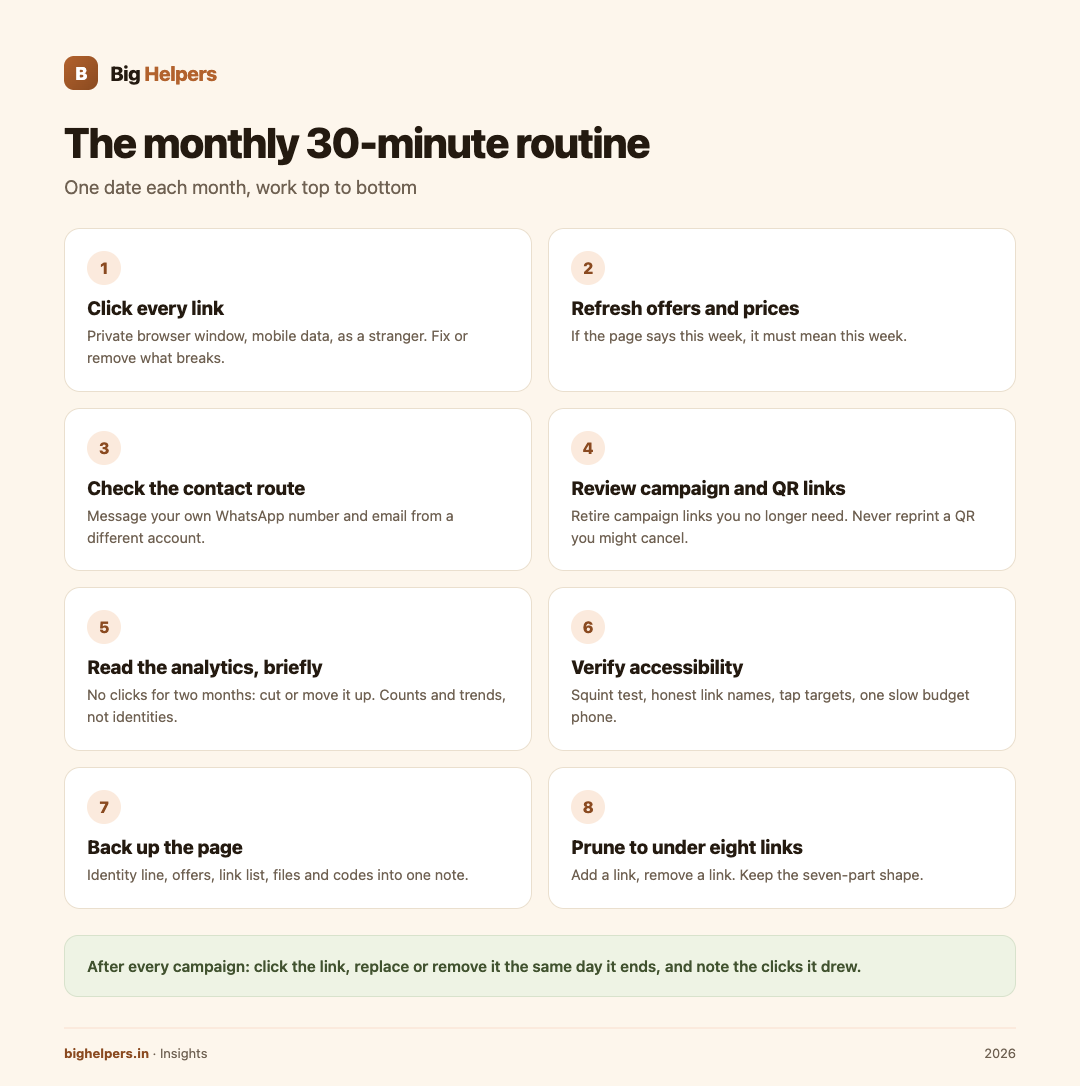
The monthly 30-minute routine
Fix a date, such as the first Saturday, and work top to bottom.
1. Click every link, as a stranger. Open your page in a private browser window on mobile data, not your office wifi, and tap each button. Load errors, wrong destinations and redirect loops all surface here. Fix or remove.
2. Refresh offers and prices. Expired offers, last season's menu, last year's batch dates. Anything dated must be current or gone. If your page says "this week", it must mean this week.
3. Check the contact route. Message your own WhatsApp number and email from a different account. Confirm replies arrive where someone is watching. Update the response-time promise if reality changed.
4. Review campaign and QR links. Any link or QR code printed on cards, banners, packaging or shop counters needs a monthly click. Count how many distinct campaign links you still need; retire the rest. Never reprint a QR code that points at a URL you might cancel.
5. Read the analytics, briefly. Note which links get the taps and which never do. Two rules: a bottom link with no clicks for two months gets cut or moved up; your primary action should usually top the list, and if it does not, the button or the offer needs work, not more links. Respect the boundary of what page analytics can tell you: counts and trends of clicks, downloads and subscribers, not identities or reasons.
6. Verify accessibility in two minutes. Squint test on contrast, check that link names still describe destinations after edits, confirm tap targets have not shrunk because of a new theme, and load the page on one slow budget phone.
7. Back up the page. Copy the identity line, offer text, link list with URLs, and any files or coupon codes into one note or spreadsheet. If the platform ever changes, disappears or suspends you, you rebuild in an afternoon instead of from memory. If your tool offers version history, check that it is on and take a named snapshot before big edits.
8. Prune to under eight links. Every month, additions creep in. Cut back to the seven-part shape: identity line, primary action, proof, four to six ordered links, contact route, accessibility, privacy. If you added a link this month, remove one.
The after-campaign five-minute check
Campaigns are where pages rot fastest. After every campaign, even mid-month:
- Click the campaign link.
- Replace or remove it from the page the same day it ends.
- Note the clicks it drew, for next time.
The annual deep clean
Once a year, spend an hour:
- Rewrite the identity line from scratch; does it still say whom you help?
- Re-verify every proof claim: counts, testimonials, client names.
- Confirm every photo and testimonial still has consent.
- Change passwords and review active sessions on the platform.
- Check your handle, bio links on each social profile, and printed materials all agree.
Where YourLinks fits
YourLinks is a Big Helpers product. The Big Helpers apps page describes it as "A creator workspace for publishing and managing a link-in-bio page", with availability "Available on iOS. Android is in controlled testing."
Verified on 29 August 2026: the product site yourlinks.in lists page analytics showing clicks, downloads, subscribers and trends, plus version history, which supports checks 5 and 7 above. The site also lists file sharing, subscriber capture by email form, coupon codes, QR codes and WhatsApp integration, and states the platform is in a free worldwide beta with no card and no purchase flow. The iOS app, per its App Store listing, lets you manage and preview the page from your phone, showing the public profile with featured links, social destinations, collections and content blocks, and its privacy label reads "Data Not Collected".
The checklist works with any link tool, including a hand-built page. YourLinks is one workspace that keeps the page, its files, its codes and its analytics in one place, with the phone preview making the stranger's-eye test in check 1 easy to run from anywhere.
For the marketing around the page, the content marketing guide for Indian SMEs sets honest expectations, and the website ROI calculator helps translate link and enquiry counts into money. Creators growing beyond one page may find the creators page useful.
Frequently asked questions
How long does the monthly check really take?
Under eight links, about 15 minutes. It reaches 30 only when offers, files and QR codes have piled up, which is itself a sign to prune.
What analytics should a small page owner track?
Three numbers, monthly: total clicks, clicks on the primary action, and new subscribers if you capture them. Trends over three months matter more than any single month.
What can page analytics not tell me?
Who the visitors are, why they left, or what they thought. Analytics count taps, not feelings. Never paste tracking beyond what your platform provides onto a simple page.
How do I back up a page I do not host?
Copy the text and every destination URL into a note, download the files, and screenshot the layout. That is enough to rebuild anywhere.
Is a dead link really that damaging?
A dead link at the top of the page is the cheapest problem to fix and the most visible one to neglect. It converts interest into a shrug, silently, every day.
What is YourLinks exactly?
A creator workspace for publishing and managing a link-in-bio page, built by Big Helpers, currently free during its beta at yourlinks.in, with an iOS app for managing and previewing the page. Its site lists analytics, version history, file sharing, coupon codes, QR codes and WhatsApp integration.
What to do next
YourLinks is available on iOS. Android is in controlled testing. To run the monthly routine from your phone, see YourLinks on the App Store; the web workspace is at yourlinks.in, free during the beta. Android users can join the Big Helpers interest list at bighelpers.in/apps and choose Android as the platform.
Sources & references
- Big Helpers apps page - app descriptions, availability status and waitlist details, checked 29 August 2026.
- YourLinks on the App Store - app capabilities and privacy label, checked 29 August 2026.
- yourlinks.in - workspace features, free beta terms, checked 29 August 2026.
Pricing in this guide is verified as of the article date. Verify with vendors before committing budget — rates change quarterly.