
The short answer
Do not start your CRM brief with features. Start with a Tuesday. Spend three days watching how work actually moves through your team, collect the artefacts that work produces, and the requirements will write themselves with a precision no feature list can match. The method below takes about a week of light effort and produces a brief that gets you comparable quotes instead of guesses.
The reason most CRM briefs fail is that they describe software instead of describing work. A developer can build anything you describe; what they cannot do is discover, from a feature list, that your salesperson always calls from the car and never types.
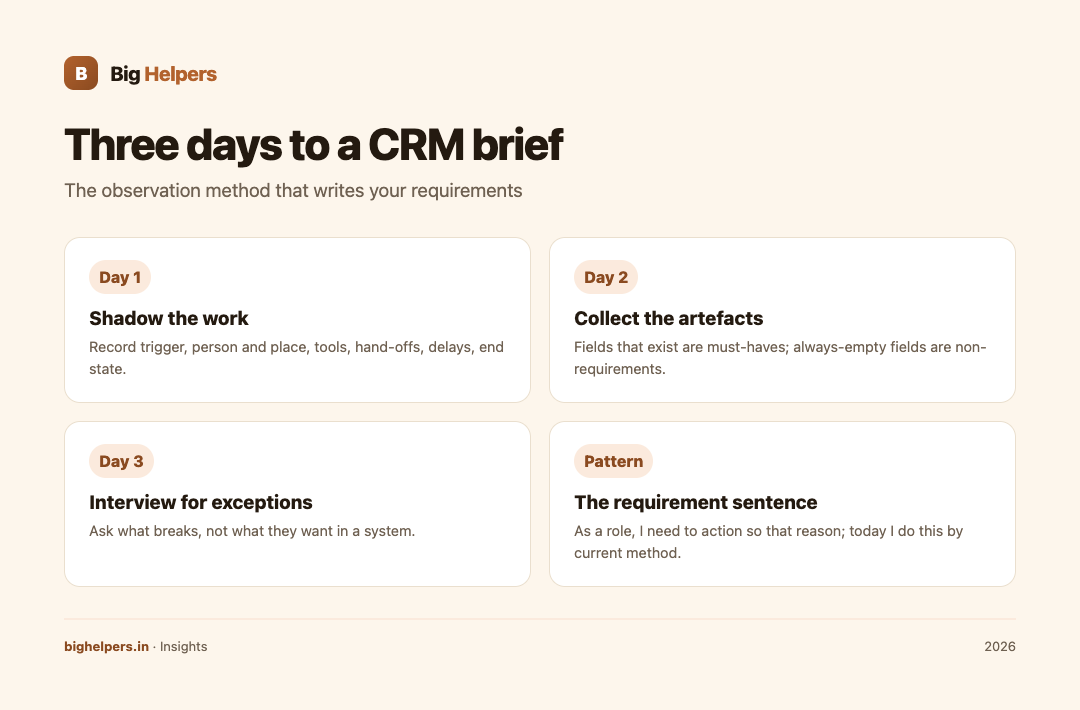
Day one: shadow the work
Pick an ordinary working day, not a month-end and not a festival lull. Follow one enquiry from arrival to outcome, and one payment reminder from realisation to message sent. Say little. Write down what happens, in order, as it happens.
Record six things for each flow:
- Trigger. What started this piece of work: a call, a form, a message, a visit?
- Person and place. Who handled it, and were they at a desk, on the road, or on a phone?
- Tools touched. Every app, sheet, notebook and printed paper involved, including the ones people are slightly embarrassed about.
- Hand-offs. Every moment work passed from one person to another, and how the next person knew it was theirs.
- Delays. Where work waited, and for how long.
- End state. What "finished" looked like, concretely: a bill sent, a site visit booked, a file closed.
Two flows are enough. Businesses with more complexity can add a third, but resist auditing everything; you are looking for shape, not completeness.
Day two: collect the artefacts
Artefacts are the physical and digital leftovers of work: the quotation format, the Excel sheet with its odd extra column, the WhatsApp message someone copies every week, the register at the front desk, the photo of a whiteboard.
Ask each person for the three things they look at most often and the one thing they hate updating. Copy the actual artefacts, with real data removed.
Artefacts matter more than interviews, because artefacts do not polish. A column in a sheet called "follow up if no reply by Friday" is a business rule wearing a disguise. A message template that everyone has personally edited tells you what the standard template got wrong.
Read them for four things:
- Fields that exist are fields the CRM must have.
- Fields that are always empty are fields nobody needs; do not build them.
- Columns holding formulas reveal the reports people actually run.
- Notes and abbreviations reveal the stages your pipeline really has, in your own language.
Day three: interview for exceptions
Now talk to people, briefly and specifically. Do not ask what they want in a system; ask what breaks. Three questions carry most of the value:
- "When was the last time a customer got annoyed, and what caused it?"
- "What do you do that you have not been able to explain to anyone?"
- "What do you check before you call someone?"
The third question is the quiet one. Whatever people check before calling, whether it is a ledger, a chat scroll or a colleague, is the information the CRM must surface automatically.
Also collect the exceptions: the customer who pays in four parts, the order that needs owner approval above a value, the lead that comes from a source with its own rules. Exceptions are where custom work earns its cost, and where standard products quietly fail.
From observation to requirement lines
Convert each finding into a single requirement sentence with this shape:
As a [role], I need to [action] so that [reason], and today I do this by [current method].
The last clause is the one owners leave out and developers value most, because it shows the real behaviour the system must beat.
Worked comparison:
- Weak: "We need a follow-up feature."
- Strong: "As a salesperson, I need the system to show me which quotes have had no reply for five days, so that I make one call list each morning; today I scroll chat history and miss some."
Same feature, completely different build quality. The second sentence tells a developer what data to keep, what logic to apply and what screen to build first.
The brief skeleton
Write ten sections, each short:
- Business context. What you sell, to whom, team size, monthly enquiry volume.
- Roles. Each role, what it must see, what it must never see.
- Current flows. Your two shadowed flows, written as numbered steps.
- Artefacts attached. The real ones, anonymised.
- Must-have requirements. Your strongest sentences, numbered for reference.
- Explicit non-requirements. What you deliberately do not want in version one. This section prevents more scope creep than any other.
- Exceptions and rules. Approval thresholds, part-payment handling, source-specific behaviour.
- Reports. Phrased as questions owners ask, such as "which leads went quiet this week".
- Constraints. Devices staff use, offline needs, data location, budget range, timeline.
- Acceptance. How you will test the result, in plain scenes: "salesperson opens phone at 9 am and sees today's list".
If you would rather not build this from scratch, Big Helpers publishes a free nine-section CRM requirement template covering business basics, pipeline stages, roles, lead sources, integrations, reports, mobile needs, hosting and data, and timeline and budget. It is downloadable from the CRM requirement template page, and it is vendor-neutral, so you can send it to any developer.
Example
Example: a four-person equipment supplier runs the three-day method. Shadowing shows the salesperson prepares quotations on a phone from customer sites, using a format saved as a photo. The artefact collection finds a sheet with a "waiting for PO" column nobody updates. The exception interview reveals that orders above a certain value need the owner's approval, which currently happens by phone and is never recorded.
The brief that emerges asks for mobile quotation creation, one stage list that includes waiting for PO, and an in-app approval step with a record. Nothing exotic, and every line traces to an observed behaviour, which is why the quotes that come back are close together in price.
Common mistakes
- Interviewing first and observing never. People describe intentions; artefacts reveal practice.
- Writing features instead of sentences with roles and reasons.
- Omitting the non-requirements section and receiving a quote for a palace.
- Hiding the messy parts, such as the notebook or the personal WhatsApp. The messy part is the requirement.
- Asking staff what software they want. Ask what work they do; the software conclusion is yours to make with your developer.
- Skipping acceptance scenes, then discovering at launch that "done" meant different things to each side.
Frequently asked questions
How long should the finished brief be?
Six to ten pages including artefacts. A longer brief usually means requirements have not been prioritised, not that the project is bigger.
Do I need to know technical terms?
No. Describe work in plain language and attach the artefacts. Translation is the developer's job; honesty about behaviour is yours.
What if my team works differently from each other?
That is a finding, not a problem. Record each version, then decide with your developer which becomes the standard and which becomes an exception.
Can I use this method for something other than a CRM?
Yes. The same three days produce excellent briefs for portals, apps and internal tools.
What if we have no written records at all?
Even better, in one sense: your artefacts are chat threads and call logs. Print a week of them and mark each customer touch; the pattern is usually visible within an hour.
How does this connect to choosing a framework?
It sits immediately before that decision. Once your brief states what must be built, the internal build framework choice becomes a technical conversation your developer can have honestly.
Your next step
Book your three days this month and aim for ten strong requirement sentences by the end of the week. When the brief exists, the custom CRM service can quote against it precisely, and the free MVP scope builder tool can help you sanity-check what belongs in version one. A 60-person SME that moved from six Excel sheets to one CRM in eight weeks started exactly this way, with the work mapped before the build began; the case study shows the result.
Sources & references
- Free CRM requirement template: the nine-section fillable brief this method feeds.
- Big Helpers custom CRM service: quotes against a written brief.
- Building an internal CRM in 2026: the framework decision that follows the brief.
- MVP scope builder tool: for sanity-checking version one.
- Case study: SME CRM replacement: the 60-person example cited in the closing step.
Pricing in this guide is verified as of the article date. Verify with vendors before committing budget — rates change quarterly.