
TL;DR: five boundaries
Keep personal service planning on your phone inside five boundaries:
- Sensitive content stays out entirely
- The device is locked
- Backups are chosen knowingly
- Analytics practices are read before installing
- Nothing work-related crosses into tools your employer has not sanctioned
This article walks each boundary with practical tests. It implies no official approval of any app, including our own early-access KaryaYogi.
Boundary 1: Content, what belongs on the device at all
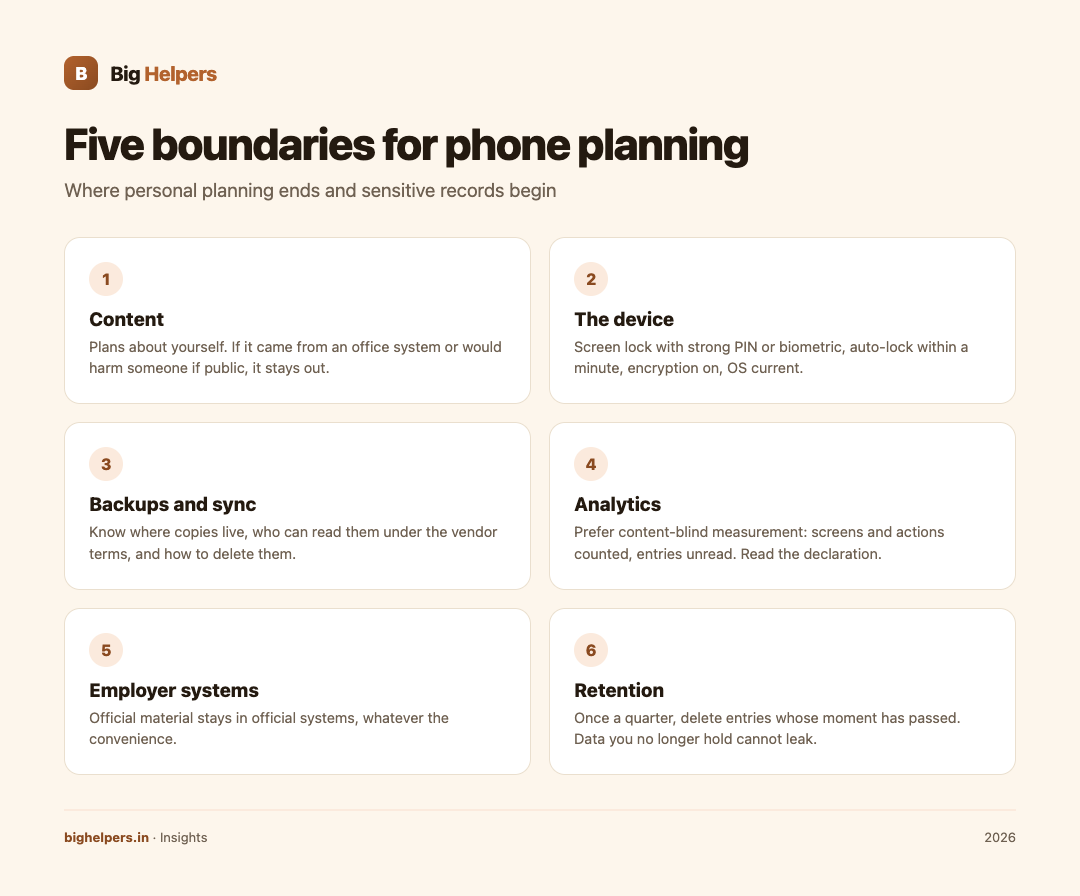
A planning app should hold your plans, not records about other people. Before any entry, apply a two-part test. First, the source test: could this text have come only from an office system, a citizen's file, a personnel record or a work inbox? Then the harm test: if this entry appeared in a public place tomorrow, whose interests would it harm? Any entry that fails either test does not belong on a personal device, whatever the app promises. Notes about your own deadlines, your own leave plans and your own drafts are the natural residents; route or travel logs of field visits, grievance details, screenshots of office e-mail and scanned certificates are not.
Boundary 2: The device itself
Whatever the app does, the device carries everything. The working set is short: a screen lock with a strong PIN or biometric, automatic locking within a minute, device encryption on (default on current iOS and Android), the operating system current, and app installations limited to store listings you can name. A lost, unlocked phone defeats every privacy promise a planning app ever made, so this boundary precedes all others. If family members use the device, keep planning entries behind an app lock where the tool offers one.
Boundary 3: Backups and sync
Backups are where private notes quietly become multi-copy data. Ask three questions of every tool. Where does the backup live, on the device, on your own computer, or on a vendor's cloud? Who can read it under the vendor's terms? Can you delete it completely? A tool whose sync you cannot switch off or inspect holds a copy of your planning data somewhere you did not specifically choose. That is sometimes an acceptable trade, but it should be a choice you made on purpose, not a default you inherited.
Boundary 4: Analytics and what "not collected" means
Apps commonly measure usage, and practices differ sharply. The phrase to look for is content-blind measurement: counting screens opened and actions taken, while the contents of your notes stay unread by the measurement system. The opposite is a tool that uploads your entries. You can usually tell the difference from the listing and privacy note: a declaration that no data is collected, or that content stays on the device, is a meaningful signal; silence is a reason to ask. As a concrete example from our own portfolio, the INDIA 2047 store listing states that dream cards, your name and an optional state or city remain on the device, that precise location is never requested, and the store privacy label states the developer does not collect any data from the app. That label reflects the developer's declaration, and it is the standard of explicitness worth demanding from any planning tool.
Boundary 5: Employer systems and separation
Your employer's rules govern work data wherever it sits. Sanctioned systems exist precisely so that official records carry their protections; moving any of that material into a personal app strips those protections and breaches the rules that govern you at work. Keep a clean split: official material in official systems, personal planning in personal tools, and nothing that arrives through official channels copied across. Our article on what to keep together in an offline-first planning workspace sets out that separation in table form, and the boundary holds even when the personal tool is convenient and the office system is not.
Retention: the boundary people forget
Planning data ages into risk. Old entries about a transfer season, a promotion cycle or a dispute outlive their usefulness and remain readable. Once a quarter, delete entries whose moment has passed, empty the trash where the tool has one, and export nothing you would not hand to a colleague. A short retention habit protects you more than any encryption feature, because data you no longer hold cannot leak, cannot be subpoenaed and cannot embarrass anyone in 2031.
A before-you-install checklist
- Read the listing and privacy note; look for on-device storage statements and what analytics, if any, are declared.
- Check whether sync and backups are optional and inspectable.
- Confirm the tool asks for no permissions it does not need; a notes tool has no business with your contacts or location.
- Prefer tools that work without an account when that fits your use.
- Decide your retention rule before the first entry, not after the hundredth.
Where our own tools stand
Transparency about our own house: our website privacy page states how Big Helpers handles data on our sites, and our trust page collects our operating commitments. KaryaYogi, our planning toolkit for service workflows, is listed on the apps page as "Early access. The app remains in testing and review lanes", with waitlist-first access and no public store listing yet; this article therefore claims no feature or privacy property for it, and its public listing will be the place to check those claims when it ships. Nothing we make carries any official approval; what you may use for work is decided by your department, not by us.
FAQ
Is a notes app on my phone private enough for work planning?
It is private enough for your own plans if the device is locked and the boundary rules above are followed. It is never the right home for official records or other people's data.
What is content-blind analytics?
Usage measurement that counts screens and actions without reading your entries. Prefer tools that say this plainly; treat silence as a question.
Are cloud backups bad?
Not inherently. They are a trade: convenience against copies you do not fully control. Make the choice deliberately and know how to delete the backup.
Can I use personal planning tools at work?
For your own scheduling and tasks, usually yes, but your department's IT and conduct rules decide. No personal tool carries official approval by default.
How often should I clean out old planning entries?
Quarterly is a reasonable rhythm. Delete what the quarter has passed, and review what remains.
Your next step
Run the before-you-install checklist against the planning app you use today, and set a quarterly reminder to clear old entries. For how Big Helpers itself handles data, read our privacy page, and the FAQ answers common questions about our apps.
Disclaimer
This article is general information about personal data hygiene, not legal or security advice, and it implies no official approval of any application. Privacy statements quoted from store listings are developer declarations. Your department's rules govern what may be used for work, and they prevail over anything here.